Solutions/Intelligent document capture
Intelligent
document
capture
Your documents come off the scanner, AI pulls out the metadata, your teams check it and your ECM updates itself. Extraction can run on a machine in your own building, with no outside connection.
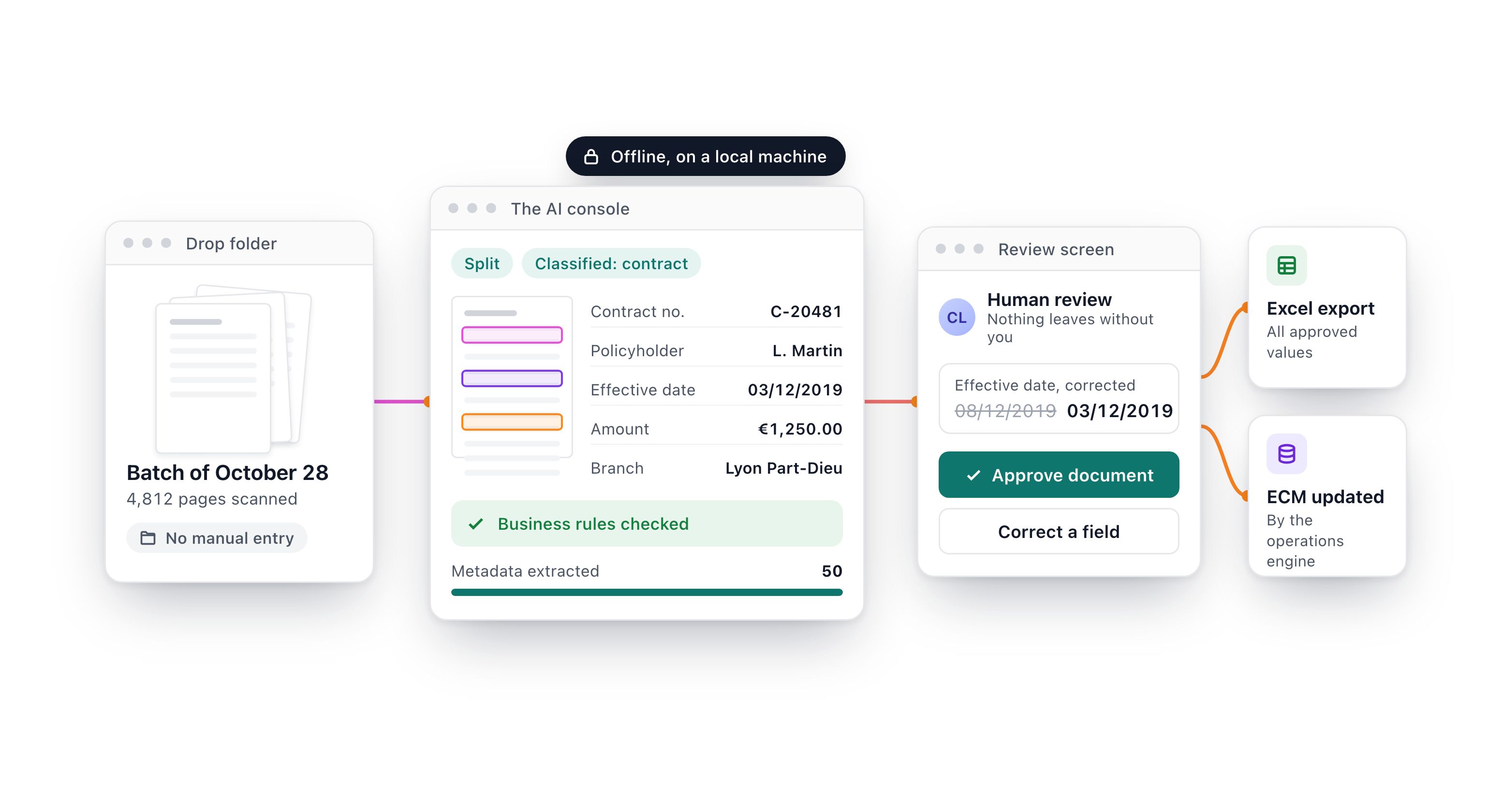
Lightweight AI that can run offline
running locally
Modern SLMs that run on your premises, on a machine that costs little.
to improve
Give the model instructions and a few examples, and you see gains right away. If needed, we go as far as fine-tuning it.
in minutes
It plugs into your tools and is set up in minutes, with no heavy project.
stays offline
When your business requires it, no document leaves your network.
The model of your choice: a small model offline, or a large online model when your data allows it.





Why we built this
- Tools that get installed, then abandoned. Traditional capture is often set up and then dropped. Its success rate stays low.
- Tools that are hard to improve. Better results take specialists, for every new document type.
- Promising LLMs, but online. The large-model approach works, but most solutions send your documents to the cloud.

Intelligent capture features
Document separation
A batch scanned in one go is split automatically, document by document.
Classification
Each document gets its type, based on your own classification scheme.
Metadata extraction
Up to fifty values per document, checked against your business rules.
Review and correction
A clear screen where your teams approve or correct each value. Nothing goes out without their sign-off.
Export
Approved values come out in an Excel file, ready to load into your ECM.
ECM import and update
With Fast2, documents and their metadata go straight into your ECM, or update what is already there.
Compatible with your ECM
M-Files, Alfresco, Documentum, FileNet, SharePoint, OnBase, Nuxeo or cloud storage: Fast2 loads your documents and their approved metadata, or updates what is already there.










Your ECM is not on the list? The Excel file imports anywhere, and Fast2 has many more connectors. Let’s talk.
The technology behind the solution
Where to start
Let’s talk about your next digitization project. In thirty minutes, we look at your documents and what we can get out of them.
Your questions about intelligent document capture
What is intelligent document capture?
It is AI reading your incoming documents automatically: a scanned batch is split document by document, each document gets its type from your own filing plan, and its metadata is extracted.
Your teams approve the values on a dedicated screen, then documents enter your document management system with their metadata.
How is intelligent capture different from traditional OCR?
OCR turns an image into text. Intelligent capture understands the document: it separates it from the rest of the batch, classifies it and extracts the useful values, checked against your business rules.
Traditional capture is often installed and then abandoned, because results stay weak and every new document type needs a specialist. With a language model, a few instructions and examples are enough to improve.
Can you run AI capture without sending documents to the cloud?
Yes. Capture runs on small language models that work on your premises, offline, on an inexpensive machine. When your business requires it, no document leaves your network.
When your data allows it, you can also choose a large online model. The choice of model is yours.
What information does capture extract from a document?
Up to fifty values per document, checked against your business rules: numbers, dates, amounts, parties, references, depending on what your filing plan requires.
Nothing goes out without your team's approval. They approve or correct each value on a clear screen before import.
Does capture feed your document management system directly?
Yes. The content operations engine loads documents and their approved metadata into M-Files, Alfresco, Documentum, FileNet, SharePoint, OnBase, Nuxeo or cloud storage, or updates what is already there.
If your system is not on the list, approved values also come out as an Excel file ready for import, and more connectors exist.
How long does it take to set up intelligent capture?
It connects to your tools and is configured in minutes, with no heavy project. You give the model instructions and a few examples, and the gains are immediate.
If your documents require it, the model can then be fine-tuned. The easiest way to start: show us a batch of your documents.
Does intelligent capture work for mass scanning projects?
Yes. Scanned batches are split automatically, then classified and indexed document by document. The content operations engine runs the chain and feeds your system batch after batch.
Incoming documents in your business processes benefit too, for example in insurance or banking. Once stored, they can join a business case.