Products/Uxopian AI
Put AI to work across your documents, cases and existing workflows
Uxopian AI turns enterprise content into actionable information directly inside the applications your teams already use.
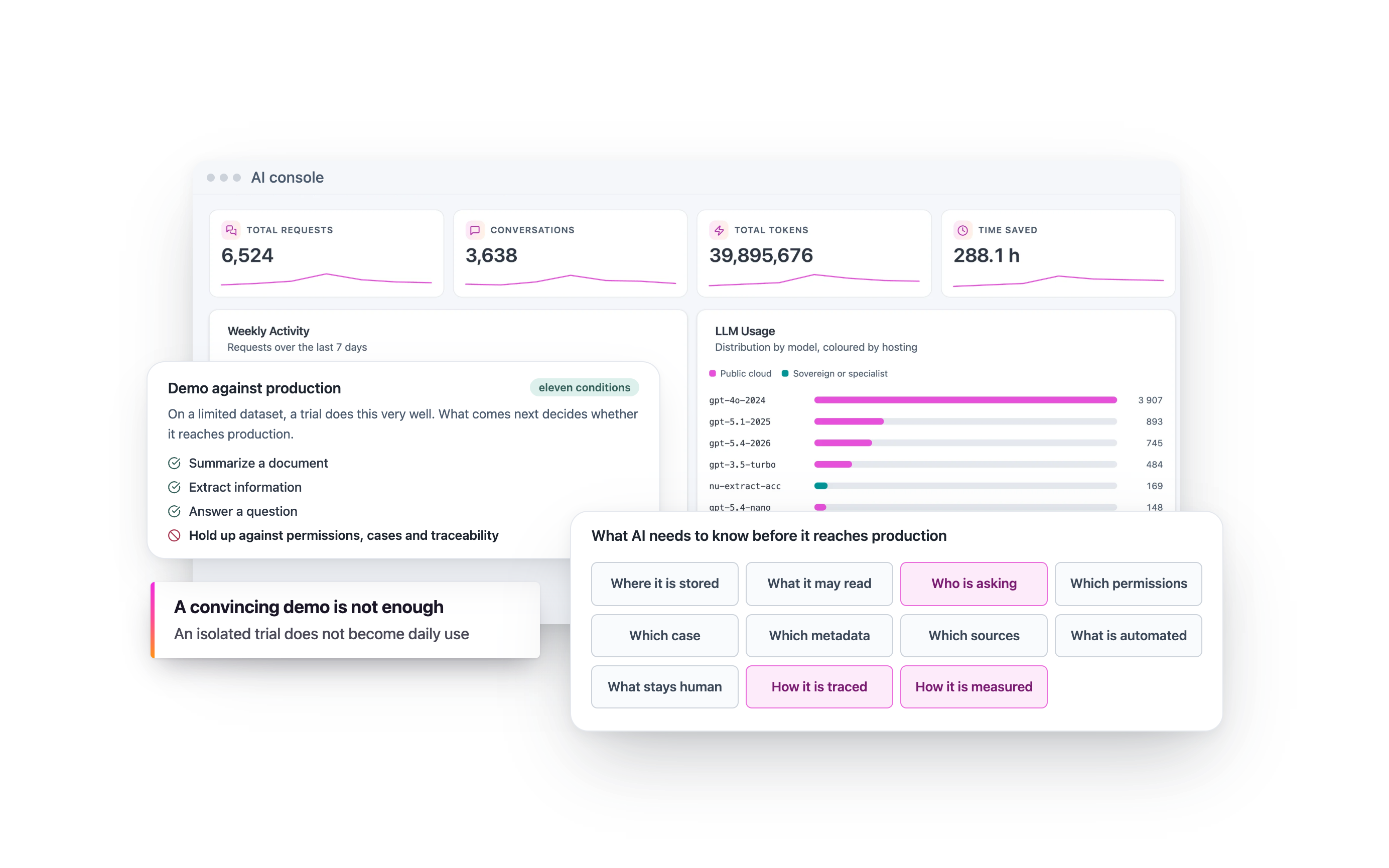
Summarize documents. Extract information. Classify content. Compare versions. Detect inconsistencies. Support document-heavy workflows, without rebuilding your information systems around another AI platform. Start with one targeted use case. Deploy it in a governed environment. Measure its operational impact. Then scale from proven value. AI moves from proof of concept to production when it connects to the reality of your organization: your content, access rights, business rules, workflows and human responsibilities.
The challenge is not just the model. It is the gap between a successful demo and operational reality.
Demonstrating that AI can summarize a document, extract information or answer questions from a limited dataset is relatively easy. Making that same capability work reliably inside a real organization is much harder. To move into production, AI needs to understand:
- Where the relevant documents are
- Which content it is allowed to access
- Who is making the request
- Which permissions must be enforced
- Which case or process each document belongs to
- Which metadata and business rules give the content meaning
- Which sources should support an answer
- Which tasks can safely be automated
- Which decisions require human review
- How each operation should be traced
- How its impact on business operations will be measured
Without these elements, an AI proof of concept remains isolated. It may produce an impressive demonstration, but it remains disconnected from daily work, operational accountability and the controls the organization needs to run it at scale. Uxopian AI is designed to close that gap.
Bring AI to your existing systems. Not your content to another AI silo
Uxopian AI works with your existing ECM platforms, document management systems, business applications and workflows. Your teams do not have to manually move documents into another tool or abandon the applications they already know. AI can support users at the point where work actually happens: while reviewing a document, processing a case, checking supporting evidence, preparing a response or triggering the next step in a workflow. It can work with:
The result is AI embedded into the operational environment rather than another disconnected layer users have to manage.

Turn enterprise content into information teams can understand, validate and act on
Uxopian AI combines document intelligence capabilities that can be configured around each use case.
AI should help people complete the work, not just generate answers
An AI capability creates operational value only when it contributes to a real action. Uxopian AI can support different stages of everyday document-heavy work:
The goal is not to replace business judgment. It is to reduce the time teams spend searching, reading, rekeying information and performing repetitive checks so they can focus on analysis, decisions and customer interactions.

One intelligence layer across the enterprise content lifecycle
Uxopian AI provides the intelligence layer across the Uxopian Software product portfolio. But AI can only produce useful results when content is accessible, contextualized, governed and connected to the processes where decisions are made. That is why Uxopian AI works with three complementary products.
Understand documents while users are viewing them
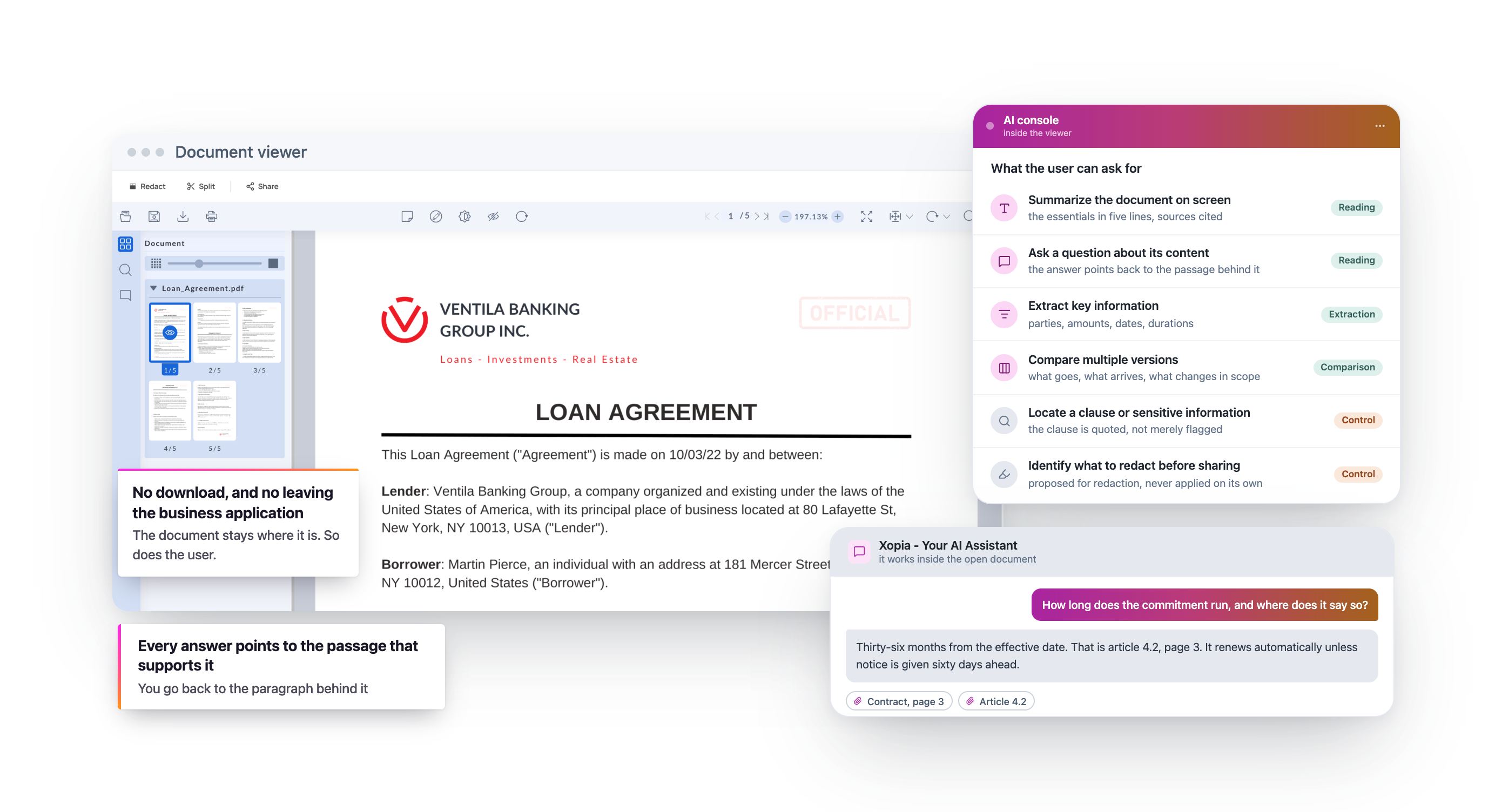
ARender lets users open, compare, annotate and secure documents without downloading them or leaving their business application. With Uxopian AI, the viewer also becomes a document intelligence workspace. Users can:
- Summarize the document they are viewing
- Ask questions about its content
- Extract key information
- Compare multiple versions
- Understand meaningful changes
- Locate a clause or sensitive information
- Identify content that should be redacted before sharing
- Navigate back to the passages supporting an AI-generated answer
The document stays in its existing content environment. The user stays in the context of the task.
Understand the case and support the next action
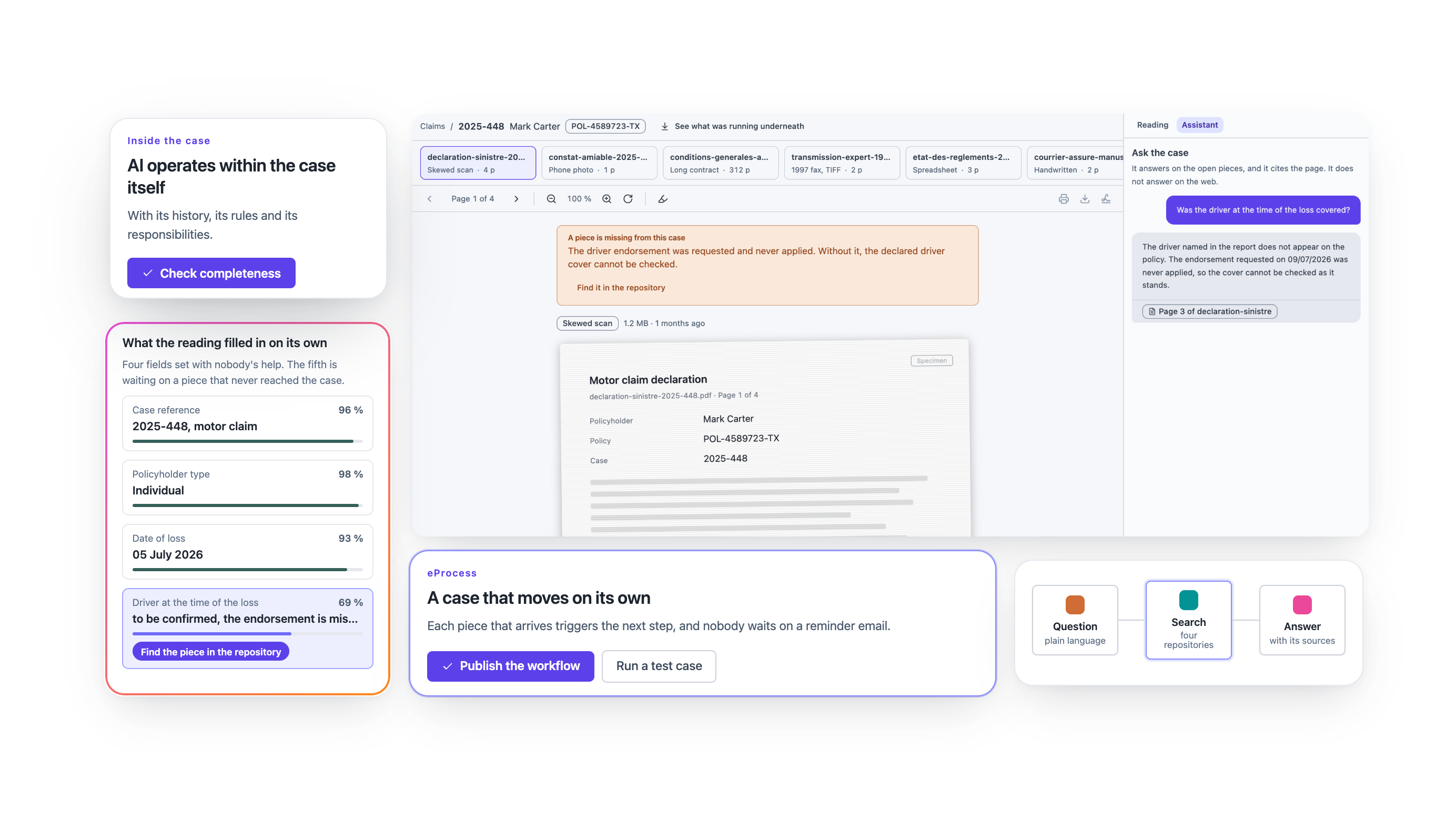
FlowerDocs brings documents, metadata, tasks and business rules together in a case management environment. With Uxopian AI, workflows do more than move cases from one step to another. They can help teams:
- Recognize incoming documents
- Extract relevant information
- Check whether a case is complete
- Compare supporting documents
- Identify inconsistencies
- Qualify a situation
- Route the case to the right workflow
- Recommend the next action
- Prepare a response
- Summarize the case for the person handling it
- Flag situations that require human attention
AI operates within the case itself, with its history, rules, content and responsibilities.
Prepare, classify and enrich content before and during transformation
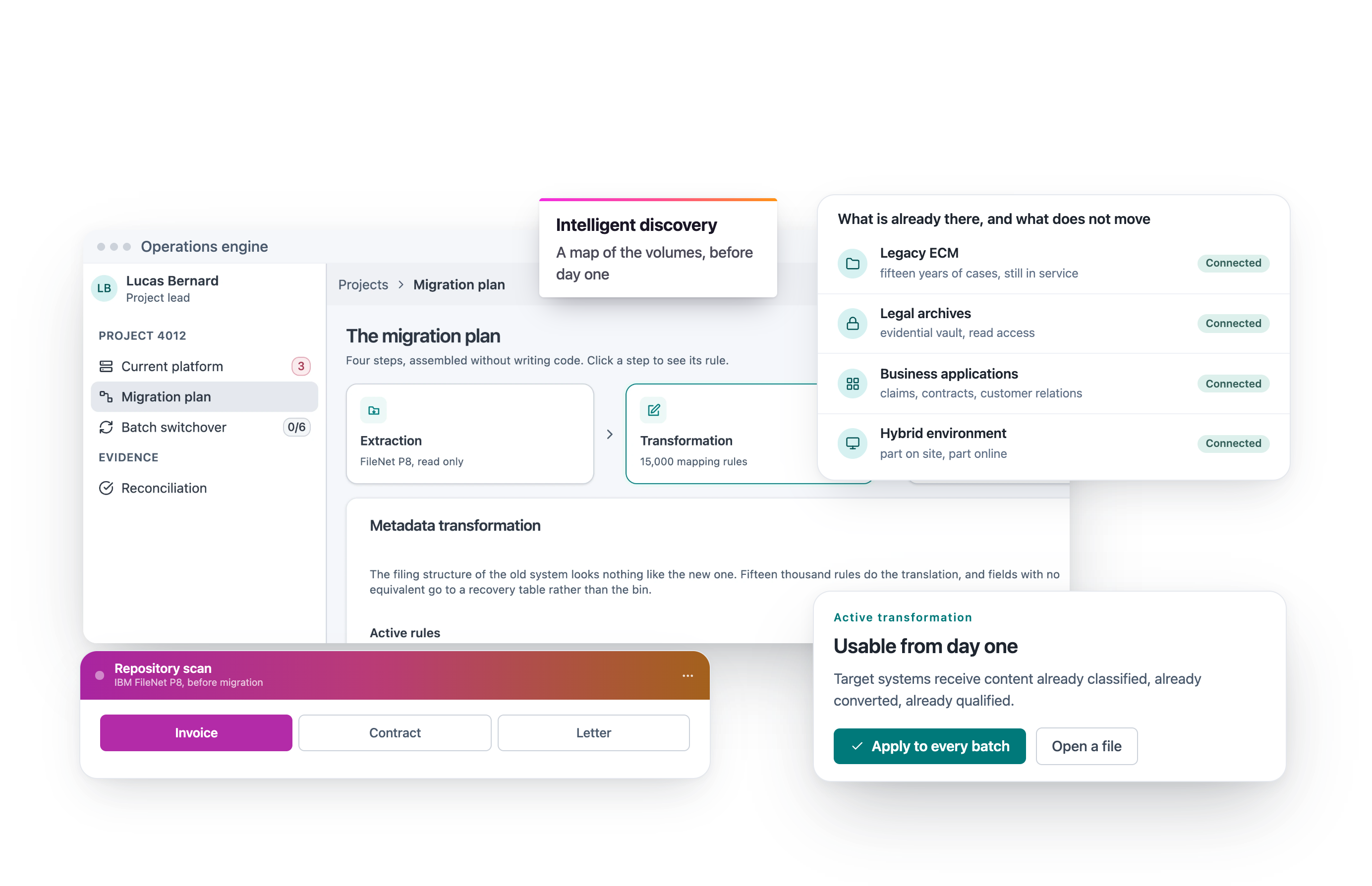
Fast2 analyzes, transforms and migrates enterprise content between document systems. With Uxopian AI, migration can also become an opportunity to improve the quality and governance of your content estate. AI can help:
- Identify the actual nature of a document
- Complete missing metadata
- Harmonize classifications
- Detect sensitive content
- Identify duplicates or obsolete content
- Associate related documents with the same case
- Detect anomalies
- Recommend a destination or retention rule
- Prepare content for future search, automation and AI use cases
You are not simply moving content from one repository to another. You are improving the conditions in which that content can later be found, understood, governed and put to work.

Start with the problem your teams need to solve
Uxopian AI can operate at different points across your content architecture. The right starting point depends less on which AI feature you want than on where information needs to become actionable.
You need to understand a document while it is being reviewed
Combine Uxopian AI with ARender to summarize, extract, compare, query and protect content directly inside the document viewing experience.
You need to understand a case and support its processing
Combine Uxopian AI with FlowerDocs to check completeness, qualify situations, assist case managers and orchestrate the next actions.
You need to clean or enrich content before migration
Combine Uxopian AI with Fast2 to classify documents, complete metadata and strengthen content governance during transformation.
You need to modernize an existing business application
Embed Uxopian AI into the application and its document services without rebuilding the entire technology foundation.
You need to regain control of fragmented enterprise content
Use Uxopian AI to analyze, classify and apply governance rules across your content estate.
Deploy AI where your content and users already are Uxopian AI is designed as an embeddable capability.
You can retain your:
- Existing ECM and document management platforms
- Business applications
- Content repositories
- Authentication mechanisms
- Security policies
- Cloud or on-premises infrastructure
- Monitoring and audit systems
- Selected language models
Do not replatform your information systems by default when you can connect enterprise content, document services, AI models and business processes within a controlled architecture. Depending on the use case, Uxopian AI can work with:
The architecture is defined around the use case, the sensitivity of the content and your operational and regulatory constraints.
AI is only as reliable as the content and context it can actually access
Document intelligence requires more than access to document text. AI needs to understand:
- Which case the document belongs to
- Which versions are relevant
- Which metadata can be trusted
- Which access rights apply
- Which business rules must be considered
- Which entity or time period is relevant
- Which sources are authorized
- What level of confidence is required
- What action is expected from the result
Uxopian AI connects content processing to its documentary and operational context. This reduces the risk of generic, incomplete or contextually irrelevant answers and helps limit AI retrieval to the information that is actually relevant to the task.

Help users verify AI outputs, not simply accept them
In critical environments, an AI-generated answer cannot be considered trustworthy simply because it sounds plausible. Uxopian AI can connect outputs back to the content that supports them. Depending on the use case, users can access:
This creates the conditions for meaningful human review and reduces the risk of decisions being made from information that cannot later be verified.
Decide what AI can automate and what must remain under human control
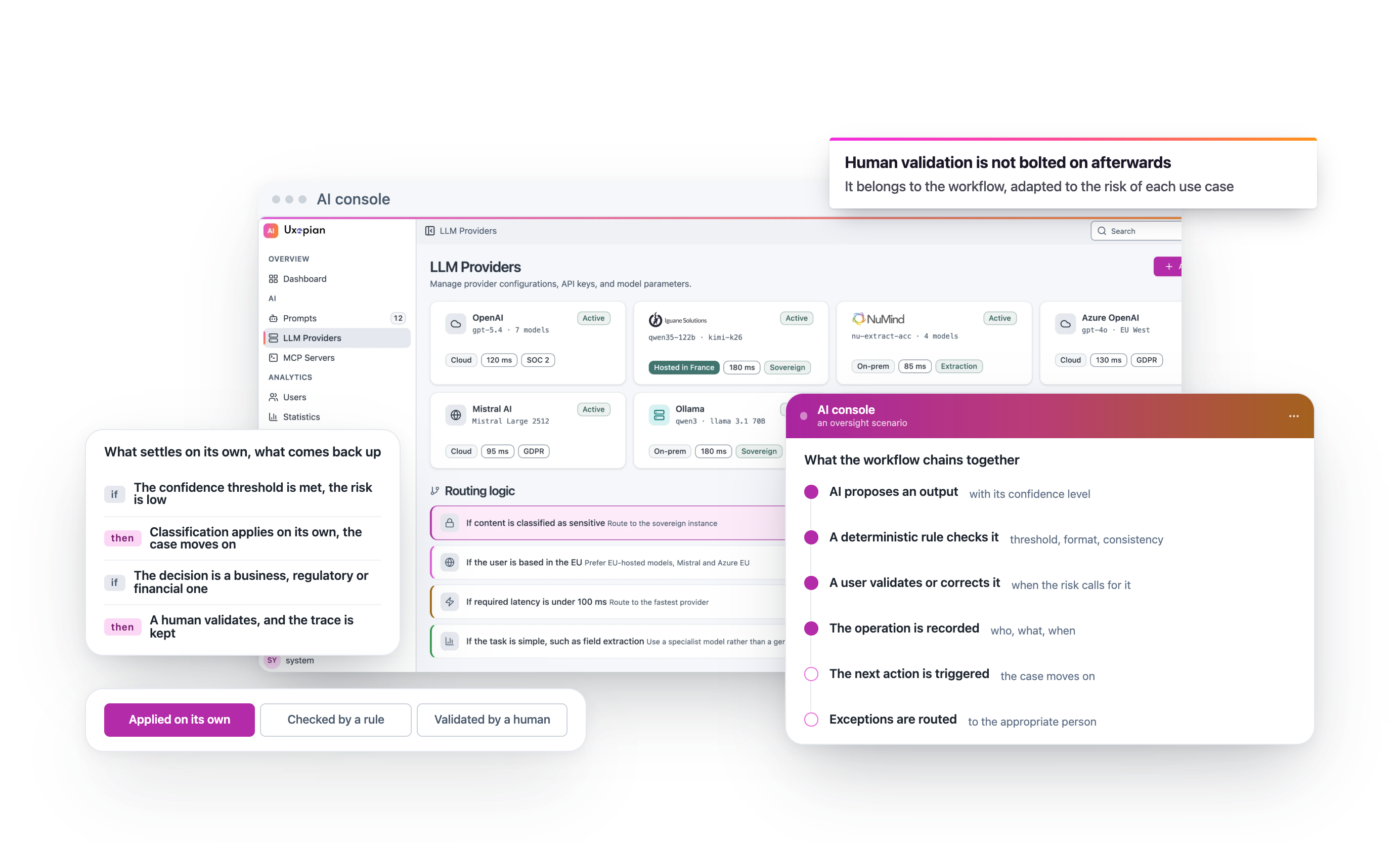
Not every AI task requires the same level of oversight. A low-risk classification may be automated when a defined confidence threshold is reached. A financial, regulatory or business decision may require explicit human validation. Uxopian AI can support workflows in which:
AI proposesan output
A deterministic rulechecks it
A user validatesor corrects it
The operationis recorded
The nextaction is triggered
Exceptions arerouted to the appropriate person
Human oversight is built into the workflow and adapted to the level of risk associated with each use case.
Keep control of your data, models, access and AI operations
Uxopian AI is designed for organizations that need to combine innovation with security, governance and operational accountability.
Define which content can be analyzed, where processing takes place and how long intermediate data can be retained.
Preserve the permissions defined in source ECM platforms, business applications and repositories. AI should never expose information a user is not authorized to access.
Choose the models and providers that meet your requirements. Uxopian AI can work with the LLMs selected by your organization and in the environments where you choose to deploy them.
Define approved use cases, authorized automated actions and the steps that require review.
Record operations, sources, rules and validations when the business or regulatory context requires it.
Start with a controlled scope. Measure the results. Adjust the rules. Scale progressively. This approach helps organizations deploy AI without creating another source of opacity or technological dependency.
Use AI with sensitive content without giving up control
Uxopian AI can be integrated into regulated environments and business-critical content systems. Depending on the implementation, the architecture can address:
- Personal data protection
- Encryption of data flows
- Environment separation
- Retention policies
- Data sovereignty requirements
- Confidentiality rules
- Processing traceability
- Output auditability
- GDPR requirements
- Sector-specific obligations
- Rules applicable to AI systems
- Operational continuity
Compliance should not be treated as a generic promise attached to a technology. It depends on how each use case, dataset, model, role, workflow and control mechanism is configured. Uxopian Software helps organizations build that governance into the way AI actually operates.

Move from proof of concept to production, one measurable use case at a time
Uxopian AI supports a progressive approach to deployment.
Identify a specific operational friction
Start with a task that consumes time, creates errors or slows down a process.
Use representative content
Work with real-world documents and their actual formats, metadata, permissions and variations.
Define the expected outcome
Determine exactly what AI should produce, the required level of accuracy and the expected processing time.
Embed AI into the workflow
Define where AI intervenes, who reviews the result and what happens next.
Measure operational impact
Track time saved, correction rates, processing volumes, exceptions and effects on process quality.
Scale from proven value
Once the use case is validated, extend it to additional document types, processes or teams. The POC becomes the first stage of deployment rather than an isolated experiment.
Production AI needs measurable outcomes
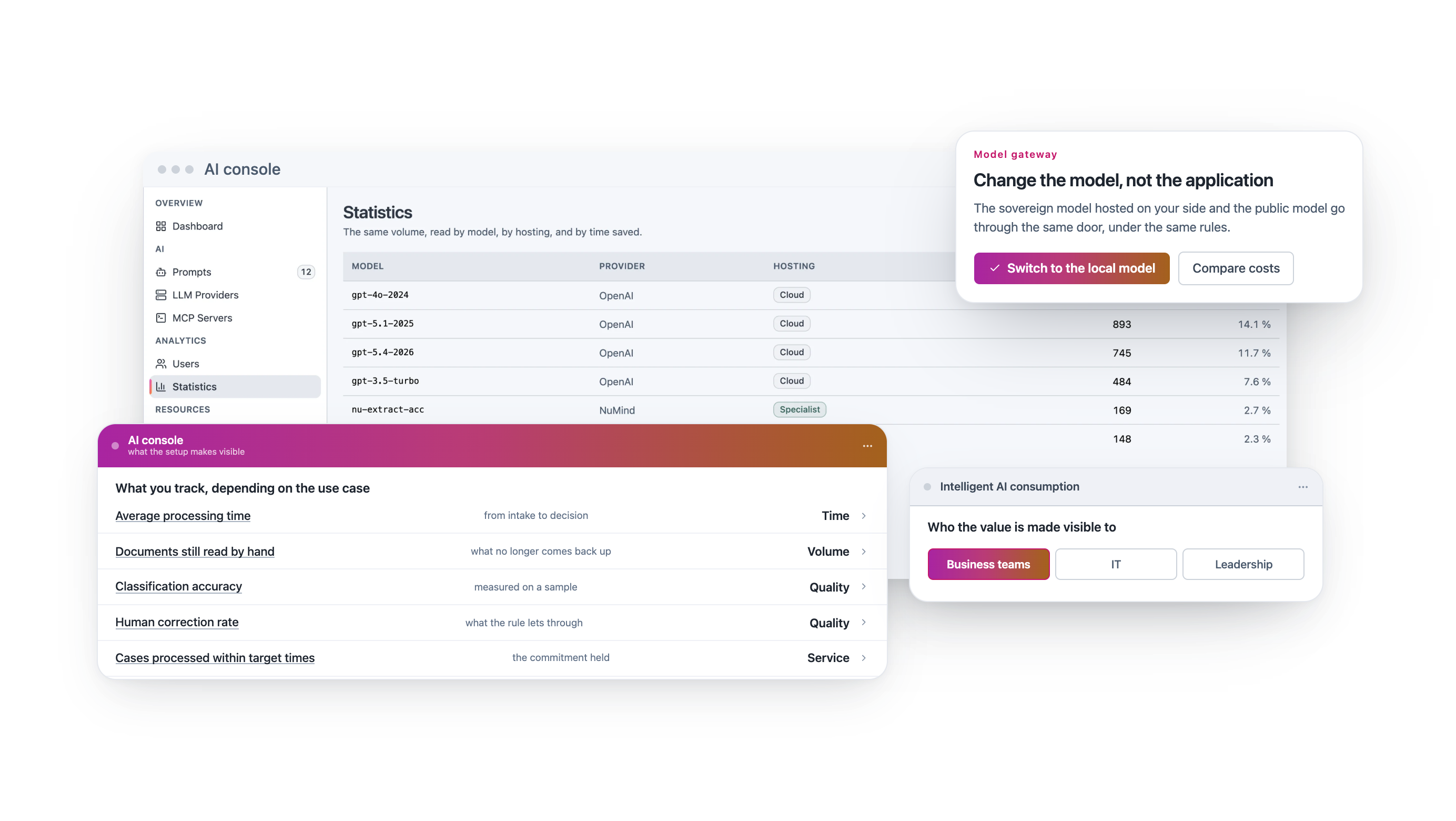
An AI solution should improve the way work gets done. Depending on the use case, Uxopian AI can help organizations measure:
- Average processing time
- Number of documents requiring manual review
- Classification accuracy
- Volume of information extracted
- Number of incomplete cases detected
- Human correction rates
- Errors prevented
- Response times
- Number of tasks automated
- Time spent searching for information
- Percentage of cases processed within target times
- User adoption
These indicators help business, IT and leadership teams decide where AI should be expanded and make its operational value visible.
Document intelligence that leads to action
Summarize a complex case
Generate a concise overview of documents, interactions and previous decisions.
Extract information from contracts
Identify parties, dates, amounts, clauses, coverage information and deadlines.
Check case completeness
Compare received documents with what is required for the relevant request, product or situation.
Compare document versions
Identify meaningful changes between contracts, amendments, policies or other business documents.
Detect inconsistencies
Flag differences in names, addresses, amounts, dates or other information across multiple documents.
Classify incoming documents
Recognize incoming content and route it to the appropriate case or workflow.
Prepare a response
Generate a proposed letter or email based on case context, with human review before it is sent.
Protect sensitive information
Identify personal or confidential information and support redaction before content is shared.
Ask questions about a document
Ask a question and receive an answer connected to the passages that support it.
Enrich your content estate
Improve metadata and classifications to strengthen search, governance, migration and future AI use cases.
Insurance: help teams process complex cases without losing context
Insurance cases can combine policies, endorsements, claims forms, supporting evidence, photographs, expert reports, correspondence and decision histories. Uxopian AI can help teams:

Summarize a claim file

Check whether required documents are present

Extract data from forms, invoices and supporting evidence

Compare declared information across documents
- Identify inconsistencies
- Locate relevant policy clauses
- Prepare customer responses
- Flag cases requiring deeper review
- Redact sensitive information before sharing
With FlowerDocs, AI operates inside the case workflow. With ARender, it assists users while they review documents. With Fast2, it prepares and governs the content estate behind them.
Banking and financial services: accelerate document review while keeping controls in place
Banks and financial institutions manage document-heavy processes involving sensitive information and strong traceability requirements. Uxopian AI can help:
- Extract information from supporting documentation
- Validate case completeness
- Compare contracts and offers
- Detect inconsistencies
- Summarize information required for review
- Identify sensitive information
- Prepare requests for additional documentation
- Assist document controls
- Trace AI outputs back to their supporting sources
Software companies and BPOs: add document intelligence without rebuilding your platform
SaaS vendors and BPO providers can embed Uxopian AI into their own applications to deliver capabilities such as:
ARender provides document viewing and transformation capabilities. FlowerDocs provides content management and workflow services. Fast2 provides ingestion, migration and content enrichment.
For IT teams: deploy AI without multiplying platforms or losing architectural control
Uxopian AI helps IT organizations:
- Build on existing systems
- Minimize unnecessary data movement
- Choose which AI models are used
- Connect multiple content repositories
- Embed AI into business applications
- Define controls and responsibilities
- Avoid disruptive replatforming
- Start with a limited scope
- Measure results before scaling
- Maintain a modular architecture
AI becomes an integrated capability of the information system rather than a parallel platform that creates another governance problem.
For business teams: reduce repetitive document work without adding another complex tool
Users continue working in their existing applications, cases and workflows. Uxopian AI intervenes when information needs to be understood, checked or transformed. Teams can spend less time:

Reading long documents

Searching for information

Rekeying data

Manually comparing documents
- Checking supporting evidence
- Preparing repetitive responses
- Redacting sensitive information
- Reconstructing the context of a case
People remain responsible for the analysis, judgment and decisions that matter.
For risk and compliance teams: govern AI before uncontrolled use becomes the problem
Uxopian AI makes it possible to bring document-based AI use cases into a framework defined by the organization. Teams can determine:
This helps reduce reliance on informal or poorly governed AI tools for processing sensitive enterprise content. The fastest path to scalable AI is not less control. It is better control.

Show us the document task slowing your teams down A standard AI demo can show what a model is capable of.
It cannot show how that capability will work with your documents, systems, permissions, workflows and operational constraints. A better starting point is one specific:
- Document type
- Case
- Workflow step
- Recurring operational problem
- Control requirement
- Measurable objective
Uxopian Software can then build a demonstration or initial deployment scenario around your operational reality.
Choose where you want to bring intelligence into the content lifecycle
Prepare and govern content
Analyze, clean, transform and migrate enterprise content while preparing it for AI, search and future business use.
Organize cases and workflows
Bring documents, data, rules and tasks together in a case management environment enhanced by AI.
View and understand documents
Open virtually any document format, compare content and bring AI directly into the document viewing experience.
Explore Uxopian Software solutions by business challenge
- Modernize an existing application with AI Add document intelligence without rebuilding the entire application.Modernize existing applications with AI
- Migrate ECM without a Big Bang Transform enterprise content progressively while preserving metadata, versions, permissions and operational continuity.Explore ECM migration without the Big Bang
- Manage complex cases with AI Help users understand documents, validate completeness and make better-informed decisions.Explore intelligent case management
- View any document in an intelligent viewer Combine document viewing, comparison, information extraction and protection.Explore intelligent universal document viewing
- Regain control of fragmented content Analyze, classify and govern enterprise content across repositories.Explore enterprise content governance
- Extend Microsoft 365 with AI capabilities Add the content services required for complex and regulated document use cases.Explore content services for Microsoft 365
Your questions about Uxopian AI
What is Uxopian AI?
Uxopian AI brings artificial intelligence to the documents, cases and processes already in your information system. It works inside your ECMs, document management systems, business applications and existing workflows.
It reads, classifies, extracts, summarizes, compares and checks, right where your teams work: in the open document, in the case, in the process step.
Why should document AI work on governed content?
Because the quality of an answer depends first on the information behind it. A model that reads a document out of context ignores its version, permissions, case and the rules that apply to it.
Uxopian AI works on content where it lives, with its metadata and access rights. When your content is poorly qualified, content governance puts it back in order.
Do you need to prepare your content before deploying AI?
Often, yes. Results depend on how accessible your content is, its context, metadata, permissions and the quality of the corpus.
The content operations engine can inventory, clean and enrich your content before AI uses it. It is also the time to do it if an ECM migration is planned.
Which AI models does Uxopian AI work with?
The ones your organization chooses: proprietary, open source or hosted in your own environment. You pick the models and providers that fit your constraints.
Several models can run side by side in one governed framework. Logging, monitoring and access control apply to all of them, whatever the provider.
Does the AI respect existing access rights?
Yes. Uxopian AI respects the permissions defined in your ECMs, business applications and source repositories. Access rights apply before the model is called.
A user never gets an answer drawn from a document they are not allowed to see.
How do you trace and verify AI answers?
Every answer carries its source: the document and page the statement comes from, with its version. Every call is logged with its question, answer, model and timestamp.
A check can be replayed months later, and users verify an answer before accepting it. That is what internal audit and the AI Act ask for. See also AI Guardian.
What does the AI do on its own, and what does a person approve?
You decide, use case by use case. Confidence thresholds, automated rules and the situations that require human approval are configured upfront.
Simple cases move on without waiting. Human approval stays mandatory wherever the decision commits your organization.
How do you move an AI proof of concept into production?
Start from a real task that eats time or produces errors, and test it on representative documents, with their formats, metadata, permissions and variations.
Going to production also means knowing which permissions to respect, which models to use, how to trace processing and which records to keep. The POC then becomes the first step of a rollout. The approach is described in AI app modernization.
Do you need a new platform to use Uxopian AI?
No. Uxopian AI connects to your existing systems through APIs. It works in the viewer while documents are read, in the case while it is processed, and in content operations before a migration.
It can run on-premises or in the cloud, wherever suits your document system. The four technologies around it are described on the Technology page.
AI becomes useful when it understands your content, respects your rules and fits the way work actually gets done
Uxopian AI does not force organizations to choose between AI innovation and operational continuity. It brings document intelligence to the documents, cases and processes already embedded in your information systems. ARender brings intelligence to the moment a document is viewed. FlowerDocs brings it into case management and business workflows. Fast2 prepares, transforms and governs the content that feeds it. Together, Uxopian Software products make document AI deployable across complex, critical and regulated environments without forcing organizations to rebuild everything around another platform. Start with one targeted use case. Measure its operational value. Then scale progressively without giving up control of your data, systems or decisions.