Last week, we officially launched Uxopian AI. To accompany this release, I will publish a short series of blog posts exploring different aspects of the platform. Let’s start with a core concept that quietly unlocks a lot of power: function calling.
The fastest way to understand it is through a short video. As you can see, chatting with Xopia, the Uxopian AI bot, is not just about having a conversation with a large language model. Users interact in natural language directly with documents and business data, which fundamentally changes the user experience of content-centric applications.
For example, a user can simply say:
“List all claims opened in February last year and export them to Excel, with a column that summarizes each claim.”
And that is exactly what happens.
This is only one illustration. The first release of Uxopian AI already includes a set of tools tightly integrated with ARender and FlowerDocs, such as redaction, search, versioning, unversioning, metadata editing, and more.
Each of these actions can of course be executed individually. Taken one by one, the benefit may seem limited, since clicking a button is often faster. The real value appears when these actions are combined. Redacting a list of documents returned by a search, editing their metadata, then versioning them in a single flow becomes possible. This level of flexibility is extremely difficult to achieve with a purely hard-coded user interface.
So how does this work behind the scenes?
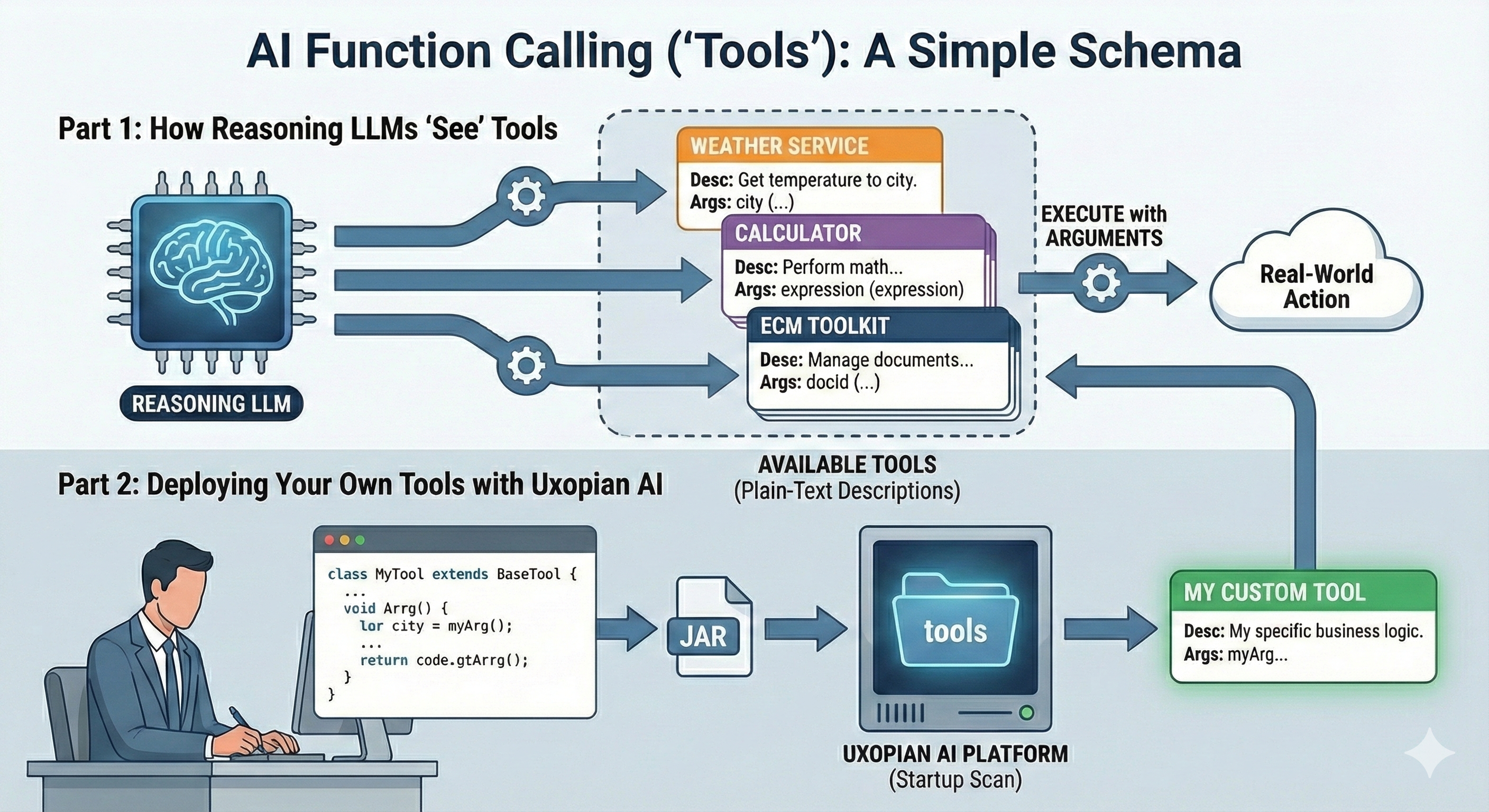
Function calling, sometimes referred to as “tools,” is one of the foundations of agentic AI. In simple terms, tools are services whose behavior and parameters are described in plain text: what the tool does, and which arguments it expects. At runtime, the language model can inspect the tools that are available, decide which ones are relevant, and execute them with the appropriate arguments.
Uxopian AI ships with a first set of built-in tools, including those mentioned above. It also allows customers and partners to deploy their own custom tools. The process is intentionally simple. You inherit from a base class provided by Uxopian AI, annotate your method with a @Tool annotation from LangChain4J, package everything into a JAR, and drop it into a configured “tools” folder. At startup, Uxopian AI scans the folder and makes the new tool available to the agent. No AI-specific logic or prompt engineering is required.
What does this mean in practice? Let’s look at a few concrete examples in the insurance space.
Consider an insurer using a CRM such as Salesforce alongside FlowerDocs and ARender for document access. You expose a tool called createCrmFollowUpTask, documented as “Create a follow-up task in the CRM for a given claim or policyholder, with a due date and description.”
A claims handler can then say in Xopian:
“Find all claims with missing police reports and create a follow-up task in the CRM for each customer, due in seven days.”
Uxopian AI searches the relevant claims and documents, identifies which cases are incomplete, and invokes the CRM tool for each one. The integration is exposed once, but it becomes usable across many conversational scenarios without writing custom workflows.
In a similar vein, you can expose a tool such as pushClaimSummaryToCrm, which takes a claim identifier and a textual summary. A user can simply say:
“Summarize this claim and push the summary to the CRM so the advisor can see it before calling the customer.”
Uxopian AI extracts the relevant information from documents, generates a concise summary, and calls the CRM tool. The advisor opens the CRM record and immediately sees a clear, up-to-date overview derived from the document corpus.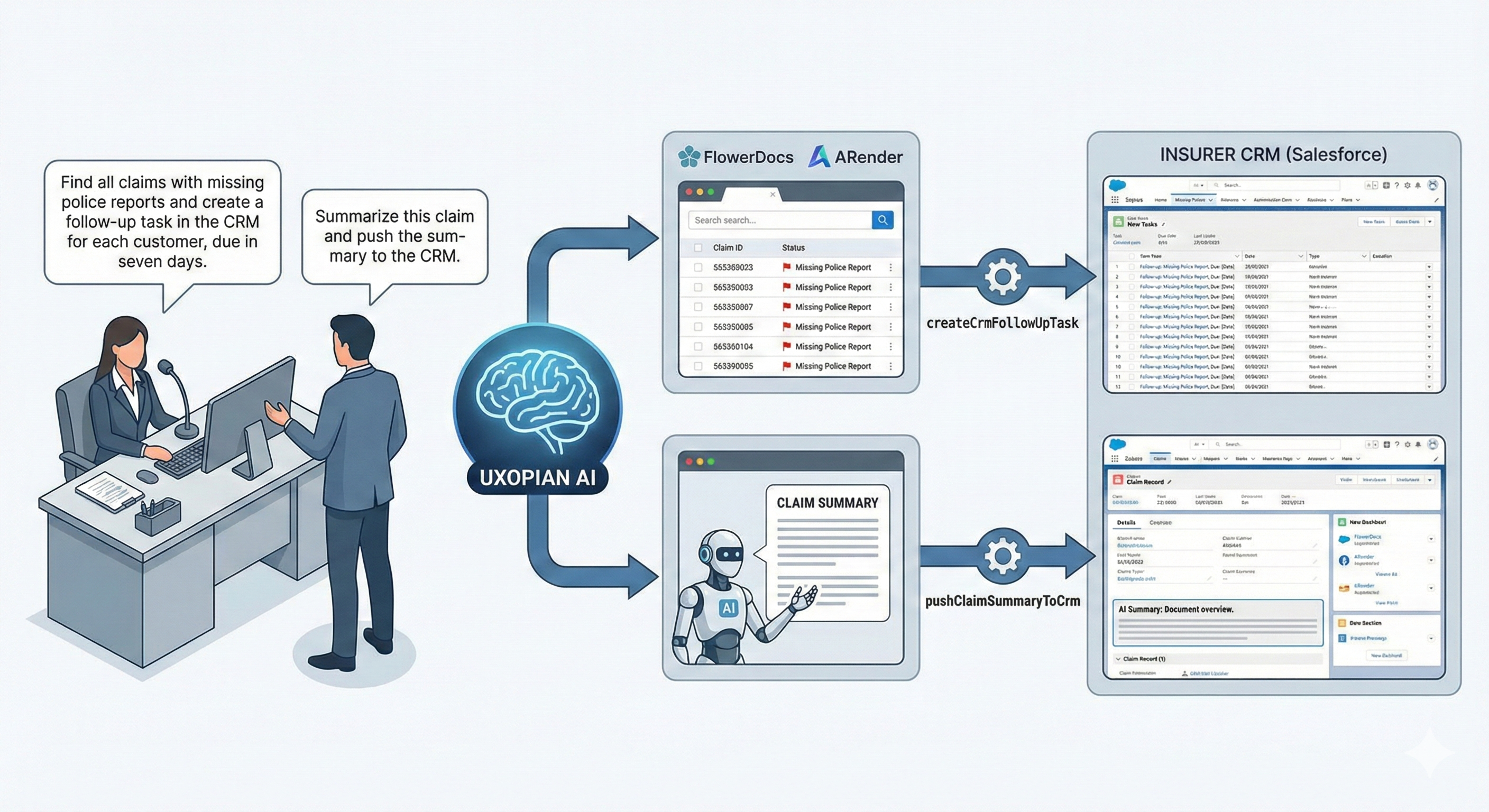
Now let’s look at a core insurance system, for example Guidewire ClaimCenter. You expose a tool named updateClaimStatusInGuidewire, described as “Update the status of a claim in ClaimCenter, with an optional reason code.”
A claims manager can say:
“Validate all claims approved last week and set their status to ‘Ready for Payment’ in ClaimCenter.”
Uxopian AI identifies the relevant claims, verifies approval evidence in documents, and invokes the Guidewire tool for each case. From the user’s perspective, this feels like a single conversational action. From an IT perspective, it is a controlled, auditable API call into the core system.
You can go further by combining document tools and core system tools. For example, you expose attachComplianceReportToClaim, which attaches a document to a claim in ClaimCenter. A compliance officer can say:
“Redact personal phone numbers from all invoices of this claim, generate a compliance report, and attach it to the claim in Guidewire.”
Several simple tools are chained together: document redaction, report generation, and claim update. Each tool is straightforward on its own, but together they form a workflow that would be complex and rigid to hard-code in a traditional UI.
MCP
As we move further toward agentic AI, Xopia will also consume MCP tools. We had already started exposing our tools both as functions directly called and through an MCP server, but the result was heavy. To keep our delivery focused, we removed the default MCP exposition of Uxopian AI tools, and a Flowerdocs MCP server will be packaged as part of our Q2 2026 effort to streamline FlowerDocs configuration and extension, notably in combination with Claude Code. The MCP server will feature both some runtime and configuration tools. Meanwhile , you can expect Alfresco, Nuxeo, and Filenet dedicated tools to be released by Uxopian as we make progress onto our roadmap, since Uxopian AI is so easy to integrate with this platform as there is already an ARender connector.
The key takeaway is simple. Uxopian AI is designed to be flexible and integrable. It can connect to document management systems, ERPs, CRMs, and core insurance platforms while keeping a clear and controlled scope. Function calling opens the door to new user experience paradigms. While interactions may take a few seconds, many use cases benefit massively from this approach. Redacting phone numbers and addresses from all invoices approved last quarter might require dozens of clicks in a traditional UI. Expressed in natural language, it becomes a single request. If it takes 30 seconds instead of 10 minutes, the value is obvious.
More to come about Uxopian AI in the next posts.