Solutions/ECM migration
ECM migration: modernise your document foundation without data loss, disruption or a Big Bang migration
Your ECM platform is ageing. Maintenance costs are increasing. Internal expertise is disappearing. Versions are no longer supported. Performance is declining. Cybersecurity and compliance risks are accumulating.
The real risk is not migration. It is remaining trapped in an ECM platform that nobody fully understands.
Meanwhile, licence costs rise, technical environments age, experts leave, audits become more difficult and migration appears more risky with every passing year.

- Millions of critical documents Long-established business workflows, implicit filing rules and inherited permissions that nobody fully understands any more.
- Inconsistent metadata Multiple versions, and archives whose underlying logic is no longer fully understood.
- An impasse Maintaining an obsolete system is expensive and increases risk. Launching a poorly prepared migration can weaken operations.
- A way out Uxopian Software removes this decision from the dilemma.
Document inertia ultimately costs more than a controlled migration.
Fast2 enables you to regain control of migration by scope, batch, source, content type or business entity. Every document follows an inspectable, repeatable and auditable processing workflow.
- By scope One entity, one repository, one business application. You decide where the first batch lands.
- By batch Every batch is inspectable and repeatable. An incident stops a batch, never the project.
- By source Documentum, FileNet, SharePoint or a bespoke repository, each with the rules written for it.
- By business entity A subsidiary, a department or a country moves when it is ready, not when the calendar says so.
Migration is no longer a leap into the unknown.
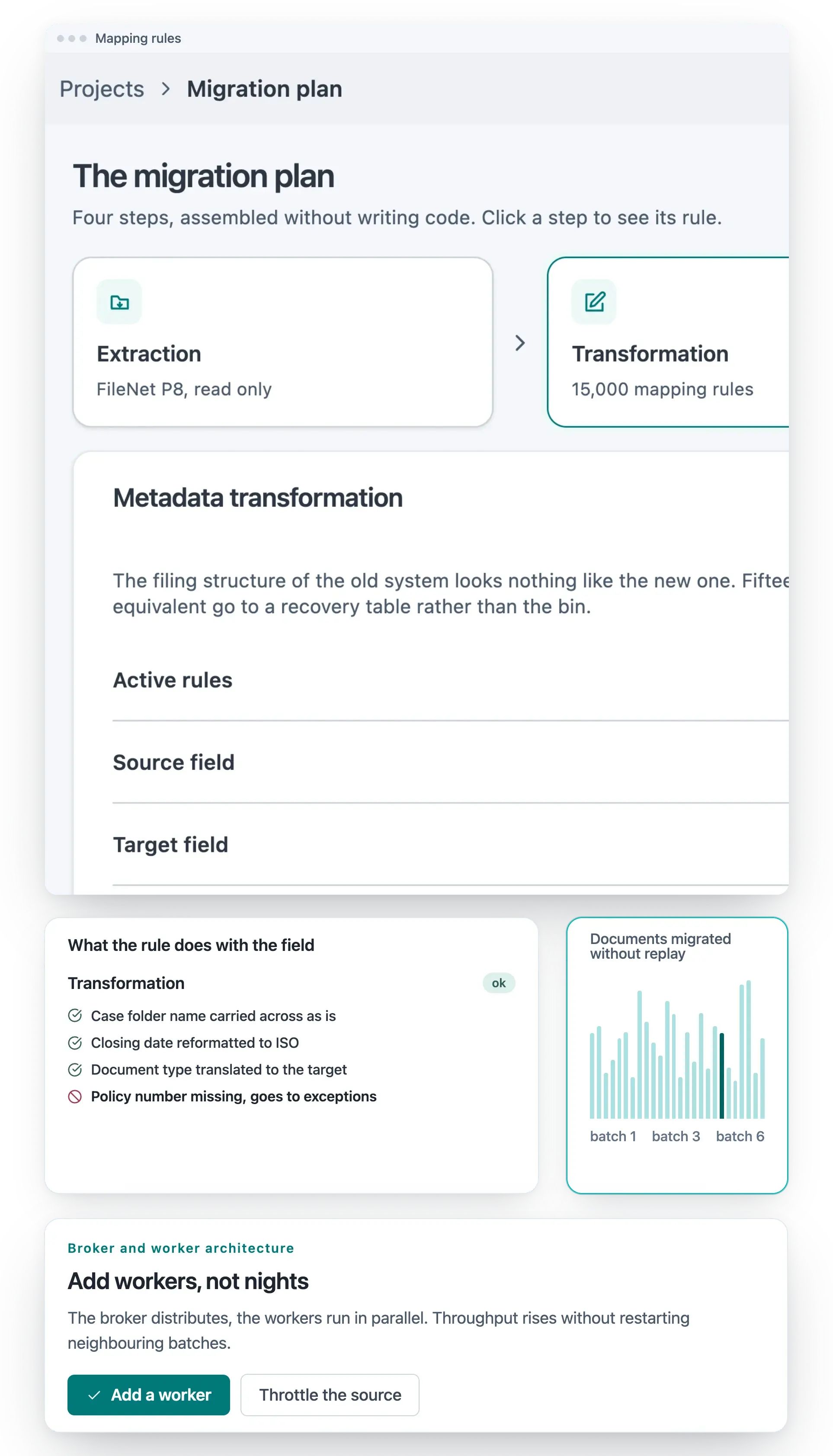
It becomes a progressive path towards modernisation. Large-scale document migrations require more than an export-import script. Fast2 is built on a broker-worker architecture. The broker orchestrates processing, maintains the overall migration state and distributes tasks to the workers.
Migration becomes industrialised. It can handle very large volumes while remaining controllable at individual document level.
Extraction
Transformation
Validation
Reconciliation
Fast2: a migration engine designed for complex document environments
The workers execute operations in parallel: extraction, transformation, validation, conversion, enrichment, reconciliation and ingestion into the target system.
Increase throughput by adding workers, limit the load placed on a sensitive source, isolate specific processing tasks or rerun only the affected batches.
A successful migration does not preserve files alone. It preserves meaning.
Within an ECM platform, documents do not exist in isolation.
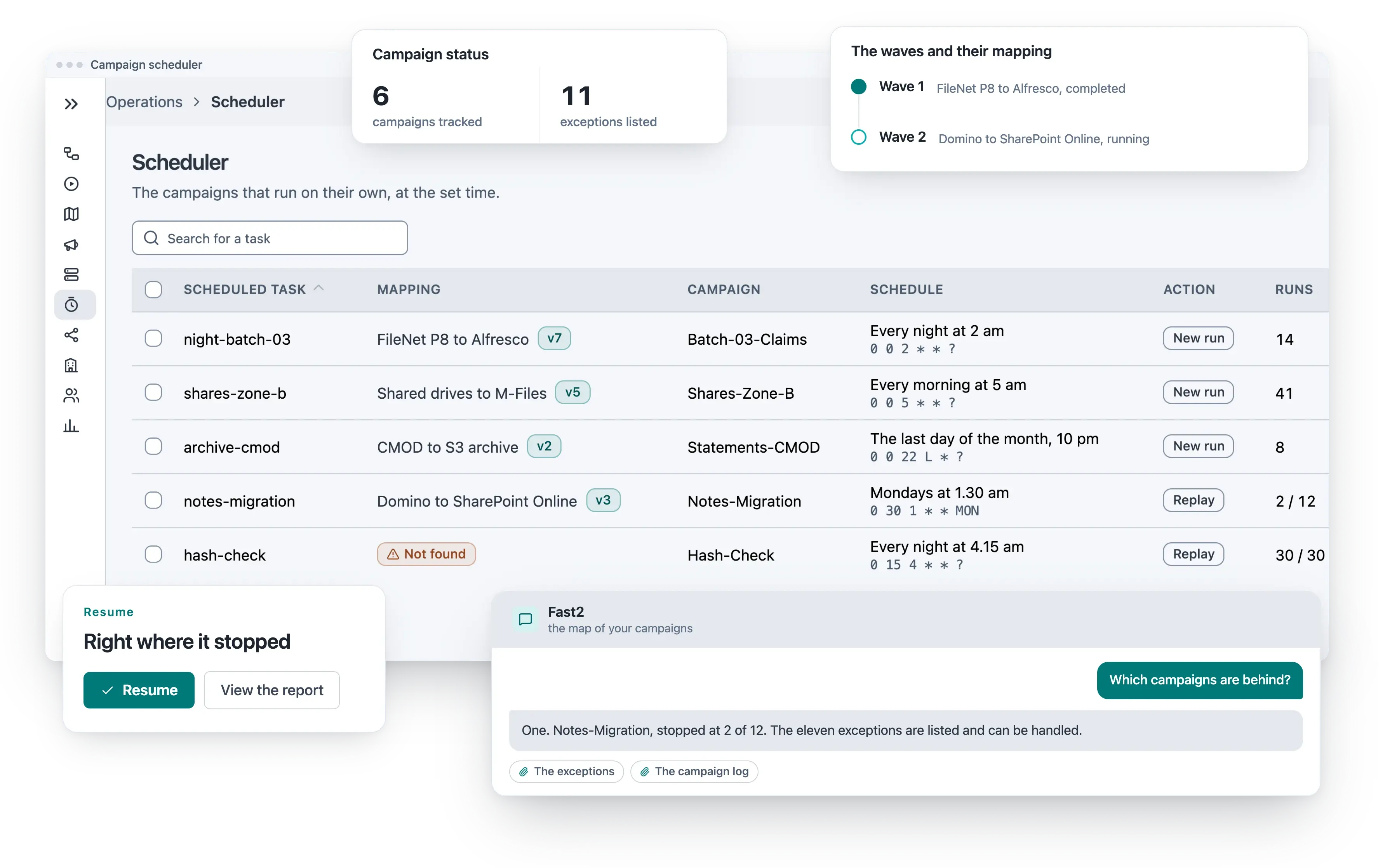
Long-running migrations inevitably encounter disruption. Fast2 incorporates checkpoint-based recovery.
At the end of an ECM migration, it is not enough to state that the documents have been transferred. You must be able to prove it.
Document structure, metadata model, access rules, formats and governance requirements. The engine writes for the target, not for the source.
This architecture allows capacity to be adjusted
Add workers
Increase throughput by adding workers.
Protect a sensitive source
Limit the load placed on a sensitive source.
Isolate a task
Isolate specific processing tasks.
Rerun what failed
Rerun only the affected batches.

What it changes
It becomes compatible with the operational realities of critical systems.
- Handle very large volumes It can handle very large volumes while remaining controllable at individual document level.
- Stay controllable Migration becomes industrialised.
- Scale the workers, not the team Capacity follows the deadline. Adding workers is a setting, not a development project.
Transform metadata without losing business context
Metadata describes the document type, owner, associated case, confidentiality level, creation date, lifecycle, retention rules, status and business context. When this metadata is lost, incorrectly mapped or oversimplified, the content may reach the target system but become less usable.
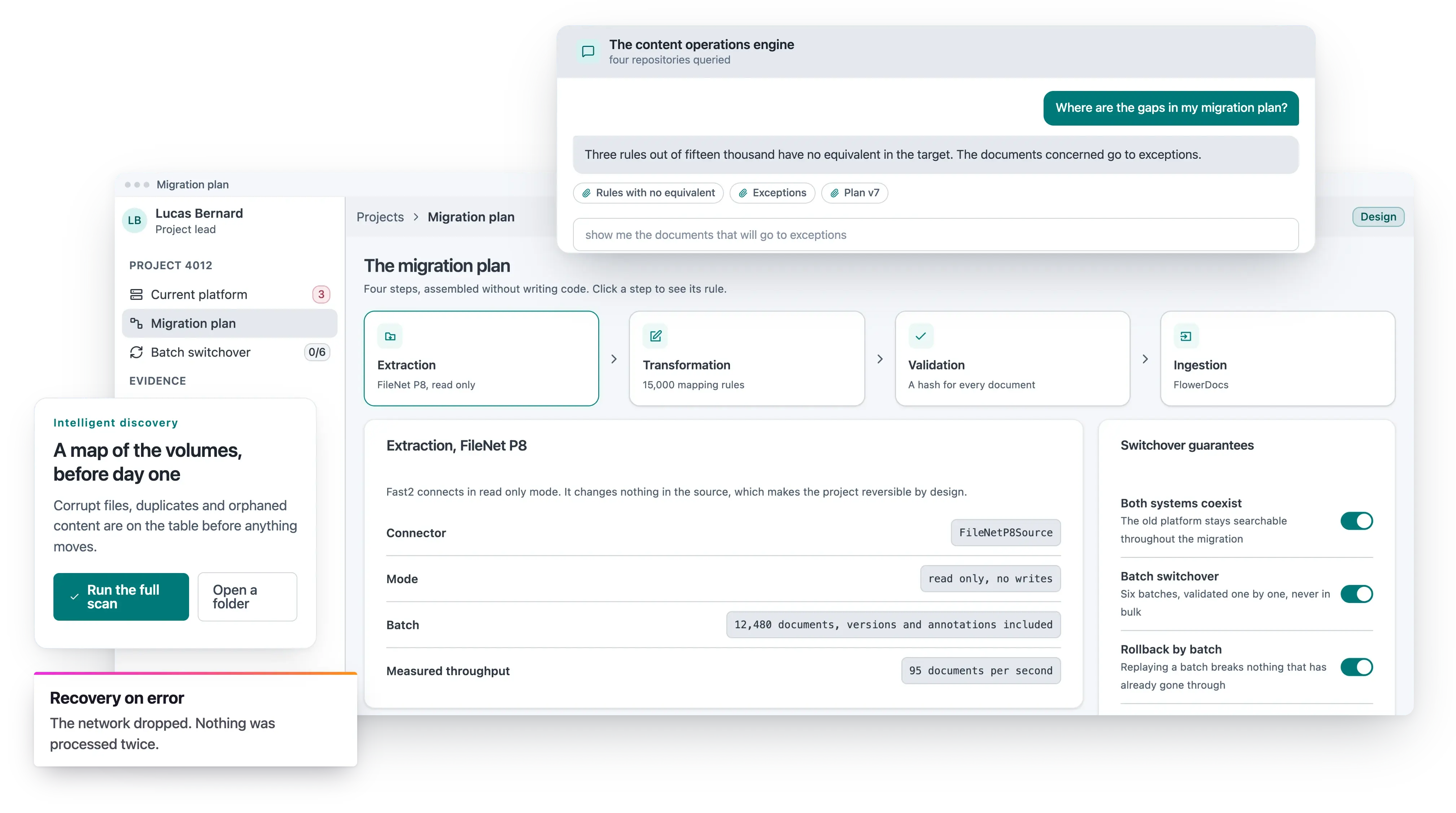
Fast2 enables metadata to be transformed during migration through field remapping, standardisation, enrichment, correction of inconsistencies, adaptation to the target structure and the application of business rules.
Documents are not merely moved. They are prepared to be governed more effectively, found more easily and used more productively within their new environment.

Preserve permissions, versions and histories
Permissions
Fast2 can take account of access rights according to the requirements of the project and the capabilities of the source and target systems.
Versions and statuses
Losing these elements means losing part of the evidence, security or business value of the content.
Histories and links
The objective is to ensure that each transferred document remains understandable, governable and usable after migration.
Workflows and access rules
The target must not become a simple file store. It must become a usable document foundation.
Resume after an interruption without restarting the entire project
Long-running migrations inevitably encounter disruption.
- Network outages The link to the source drops in the middle of a batch.
- Temporary source unavailability The legacy platform goes down for its own maintenance window.
- Server failure A worker stops. The others keep going.
- System saturation The source cannot serve at the rate the migration asks for.
- Data anomalies A document does not match the rule that was written for it.
- Planned interruptions A release window, a freeze, a weekend when the source is closed.
Fast2 incorporates checkpoint-based recovery. Every processing stage is tracked. Following an interruption, the system can resume from the point at which it stopped, without losing sight of documents already migrated or unnecessarily restarting the entire batch.
Produce document-by-document reconciliation
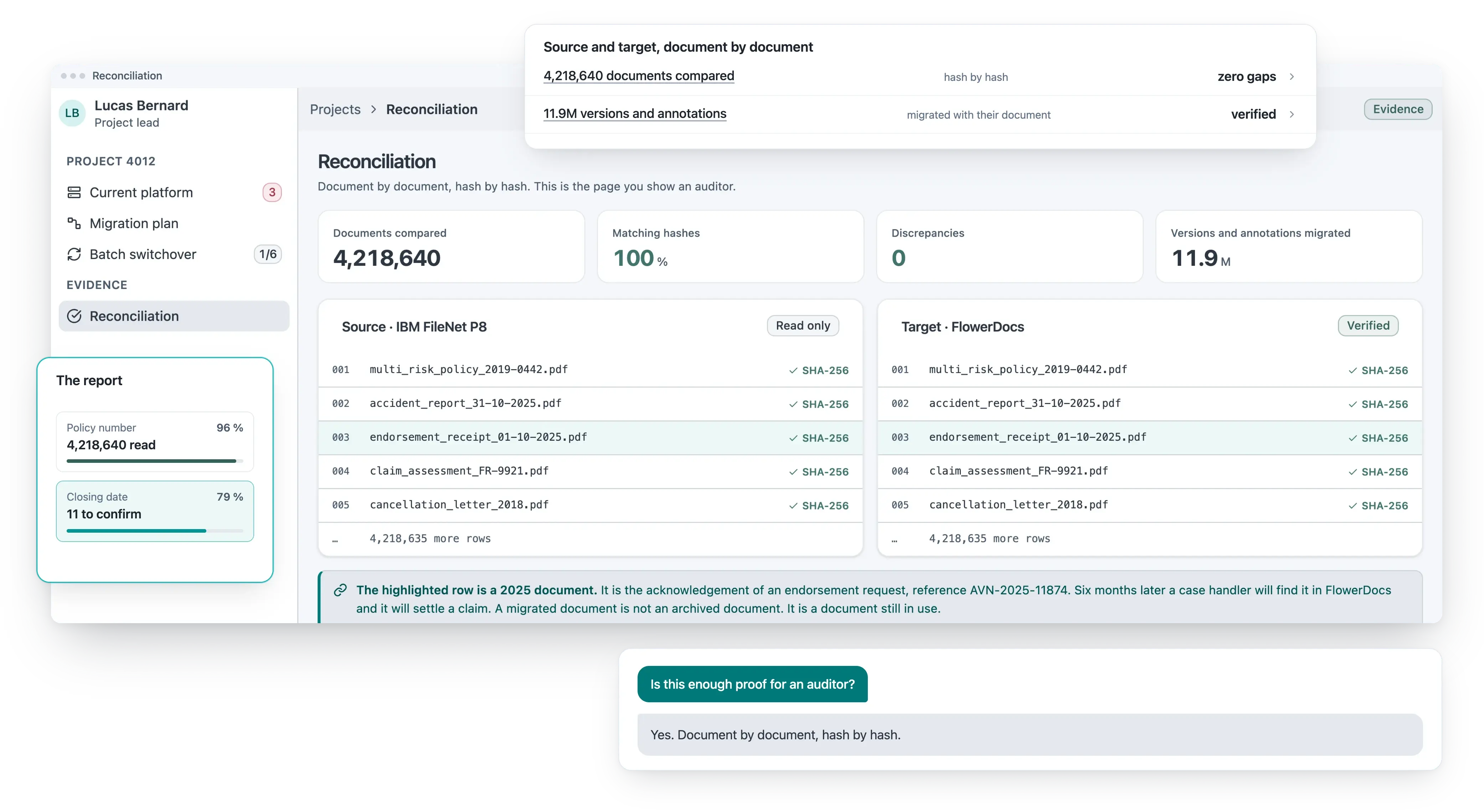
- No approximate spreadsheet Every document carries its own line, with what actually happened to it.
- A precise audit trail for every document Extraction, transformation, conversion, controls, errors, retries, ingestion and validation, each one recorded.
- From source to target, on the same line The source identifier and the target identifier sit side by side. The link is never inferred afterwards.
- Exceptions are counted, not buried A document that failed a control is listed and can be handled. It does not disappear into a log file.
- Reports an auditor can read Reconciliation reports are produced for audits, disputes or internal controls, not for the project team alone.
- Evidence that outlives the project The proof stays usable long after the migration team has moved on.
Reconciliation reports make it possible to verify transfer integrity and provide usable evidence for audits, disputes or internal controls.
Fast2 traces every document from source to target
A progressive migration rather than a Big Bang project
Begin with a limited scope
One entity, document type, repository, archive, business application, department or priority use case.
Validate on that scope
Rules, mappings, transformations, access rights, performance, exceptions and control reports.
Prove reliability
Once reliability has been demonstrated, the project can scale.
Accelerate
Start small. Prove reliability. Accelerate once control has been established.

ECM platforms, document management systems and legacy repositories
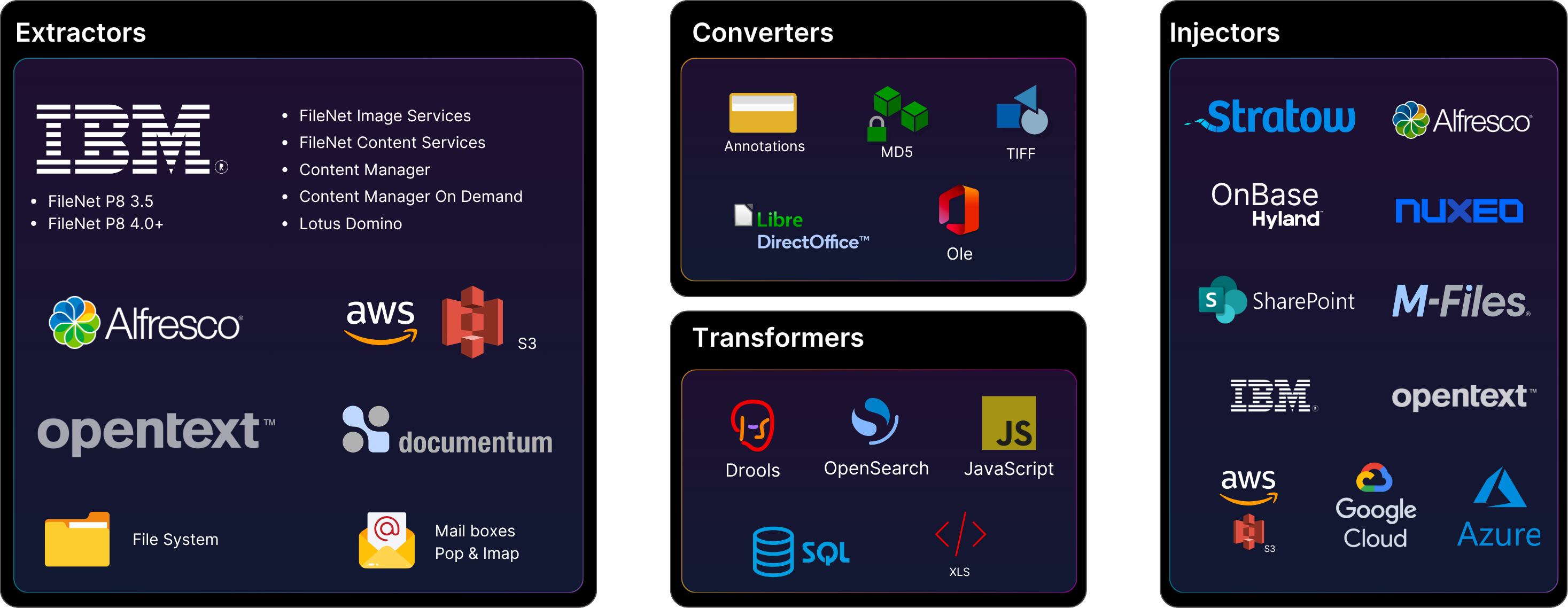
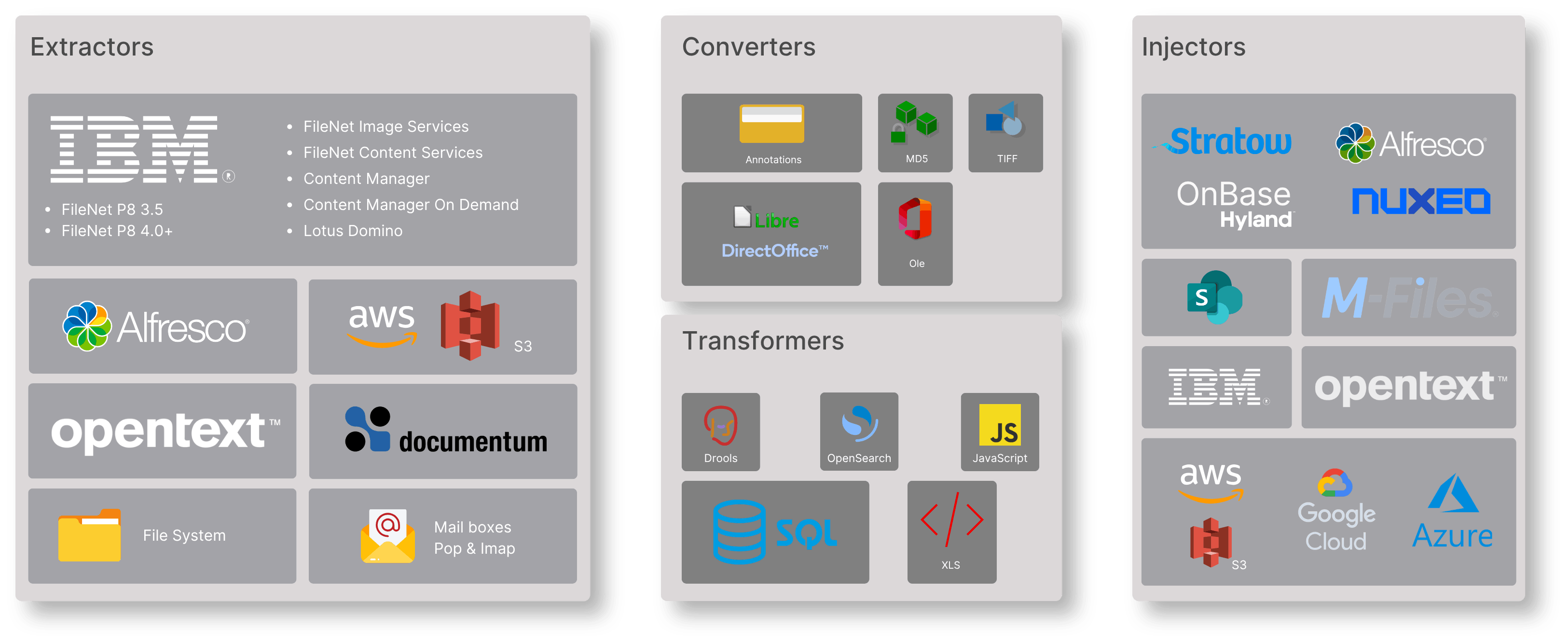
ECM targets, cloud storage and hybrid architectures
An ECM migration does not always have the same destination. Some organisations migrate to FlowerDocs. Others move to Alfresco, Nuxeo, Amazon S3, private cloud storage, a target document repository or a hybrid architecture.
Fast2 adapts transformations to the requirements of the target environment: document structure, metadata model, access rules, formats, conversions, performance constraints and governance requirements.
Migration does more than move the existing content. It prepares that content for its future use.
Conversion, enrichment and validation during migration
A migration is often the right time to improve the document estate.
This approach avoids transferring document debt unchanged. It turns a necessary migration into an opportunity for modernisation.
Apply AI to your existing document estate
Document AI only creates value when content is accessible, classified, contextualised and governed. An ECM migration can provide the ideal opportunity to prepare your document estate for these use cases.
- Analyse content The engine reads what the legacy system never indexed.
- Suggest classifications A proposal, not a decision. A person confirms it wherever the rule says so.
- Extract useful data Dates, amounts, references and parties, taken from the document itself.
- Detect sensitive information Personal and confidential content is flagged before it lands in the target.
- Enrich metadata Fields the source left empty are filled from the content.
- Route documents to the right workflows Each document arrives where the business process expects it.
However, AI must remain within a controlled framework: explicit rules, confidence levels, human validation where required, auditability and control over data. The objective is not to add an abstract AI layer above a poorly structured document estate. The objective is to make your existing content usable within the real context of your systems, constraints and business processes.
SharePoint, Documentum, FileNet and OpenText migration: turn an imposed constraint into a modernisation path
The trigger is rarely comfortable
ECM migrations are often triggered by a constraint: end of support, rising costs, technical obsolescence, corporate consolidation, application rationalisation, architectural change, cloud strategy, sovereignty requirements or an audit.
14 July 2026
Microsoft states that extended support for SharePoint Server 2016 and SharePoint Server 2019 ends on 14 July 2026. Organisations affected by this deadline must decide how they intend to preserve their content, workflows, security and continuity of access.
But it can become an opportunity
With Uxopian Software, this decision can be structured as a progressive modernisation programme rather than an imposed emergency.
Do not migrate simply to leave the old system behind. Migrate to regain control of your document estate.

What changes for your teams

For IT teams
They retain control over architecture, throughput, sources, targets, transformation rules and migration evidence. Migration becomes an internal capability that can be reused across multiple entities, systems and programmes.
For compliance and audit teams
Compliance teams gain document-level traceability, reconciliation reports and evidence relating to completed transfers. Migration does not become a grey area. It becomes a documented and auditable process.

For business teams
Business teams gain content that is more accessible, reliable and better contextualised within the target environment. Migration can be organised by scope, with validation and control stages before wider rollout.
- For executive leadership Executive leadership turns a latent risk into a controlled transformation path. It also establishes the foundations for broader modernisation: document governance, process automation, document AI and architecture rationalisation.
- One capability, several programmes The rules written for the first scope are reused by the next entity, the next repository and the next migration.
- No dependency on a single integrator Your teams manage batches, adjust workflows and control results themselves.
Migration becomes a transformation lever rather than a purely technical expense.
Results designed for production, not demonstrations
millions of documents migrated
across critical volumes
loss across critical volumes
Fast2 was designed for organisations that need to migrate real document estates: high-volume, heterogeneous, ageing, sensitive and deeply integrated into business processes.
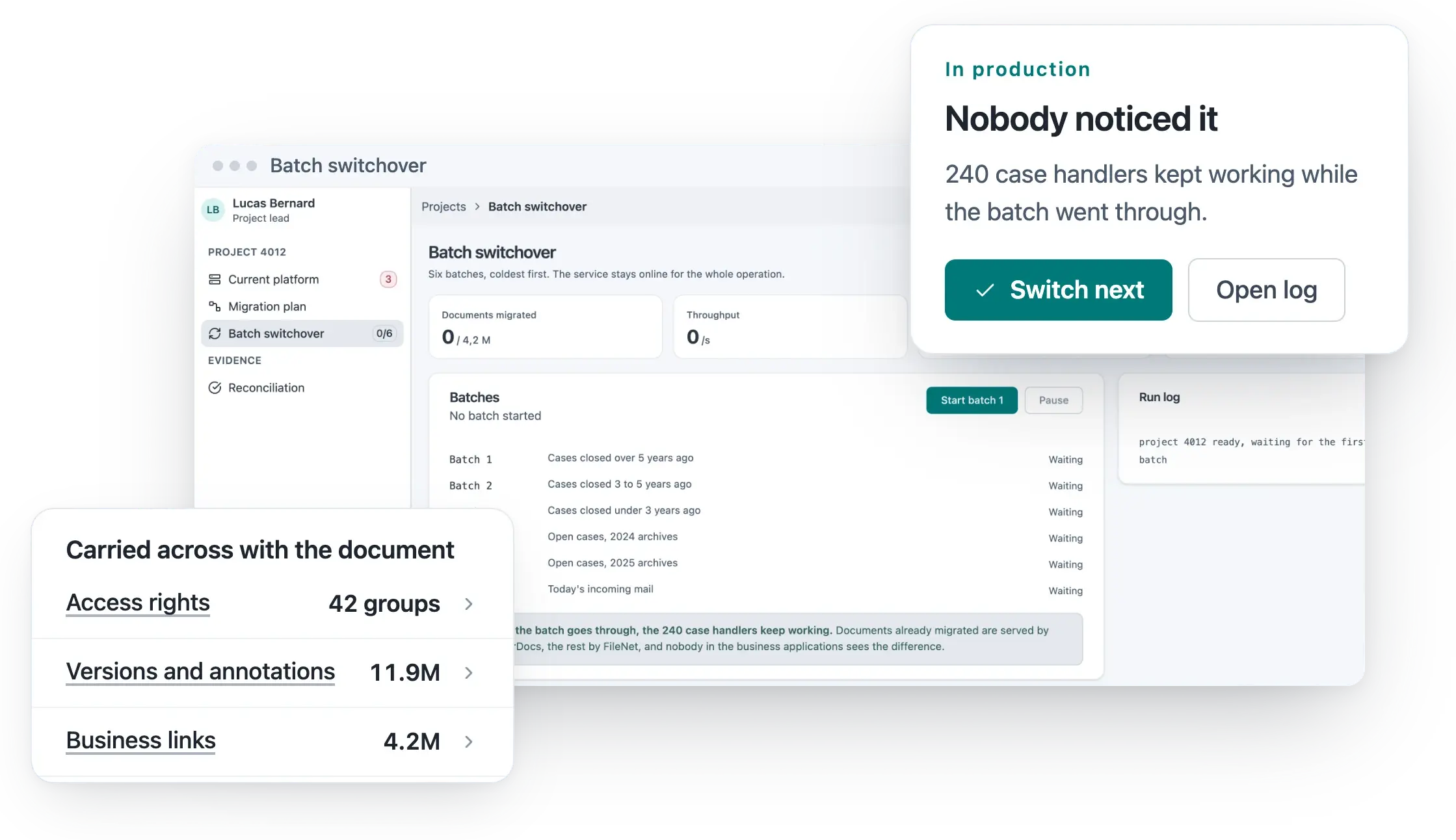
What holds it
- Multiple sources, multiple targets Documentum, FileNet, SharePoint or a bespoke repository on one side. FlowerDocs, Alfresco, Nuxeo or Amazon S3 on the other.
- Complex rules, recovery from incidents Business rules the source never wrote down, and checkpoint recovery when a long run is interrupted.
- Permissions to preserve, evidence to produce Access rights carried across, and a reconciliation report for every document.
- Teams to make autonomous Your people learn the engine on the first scope, and run the next one themselves.
Choose an ECM migration approach that gives you greater autonomy
What happens today
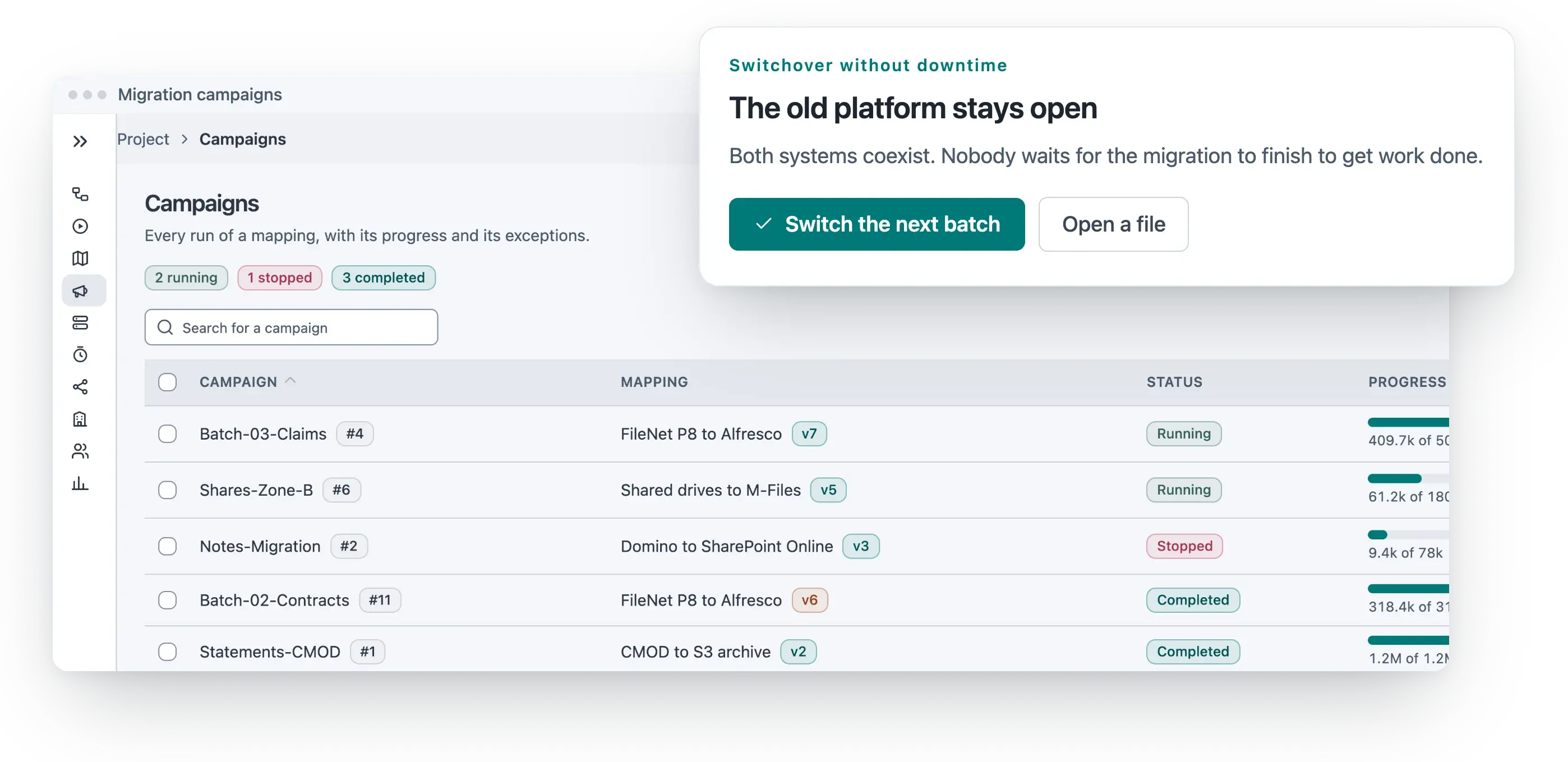
Most document migrations lock organisations into a one-off, expensive project that depends heavily on consulting support. Uxopian Software takes a different approach.
What changes
Fast2 is a configurable, observable and reusable migration engine. Your teams can learn to manage batches, adjust workflows, control results and reuse rules across other scopes. This autonomy changes the nature of the project.
Migration is no longer merely a necessary transition between a source and a target. It becomes a lasting document-transformation capability.
Stop funding document inertia. Regain control of your ECM migrations.
The migration engine: extraction, transformation, validation, reconciliation and ingestion, by scope and by batch.
Analyse content, suggest classifications, extract useful data and enrich metadata, within a controlled framework.
A target document foundation that is governable, not a simple file store.
Where to start
You can leave an obsolete ECM platform, rationalise multiple repositories, prepare a new platform, supply an AI foundation, clean up archives or reorganise a document estate at scale.
Your questions about ECM migration
Can you migrate an ECM without a big bang cutover?
Yes. The migration is split into batches: by entity, application, document type or period. The old and new systems run side by side during the transition, and each batch is checked before the next one starts.
Transformation rules are tested on your real data, on a sample first, then replayed at scale. By cutover day, only a small, proven scope is left.
What should you analyze before an ECM migration?
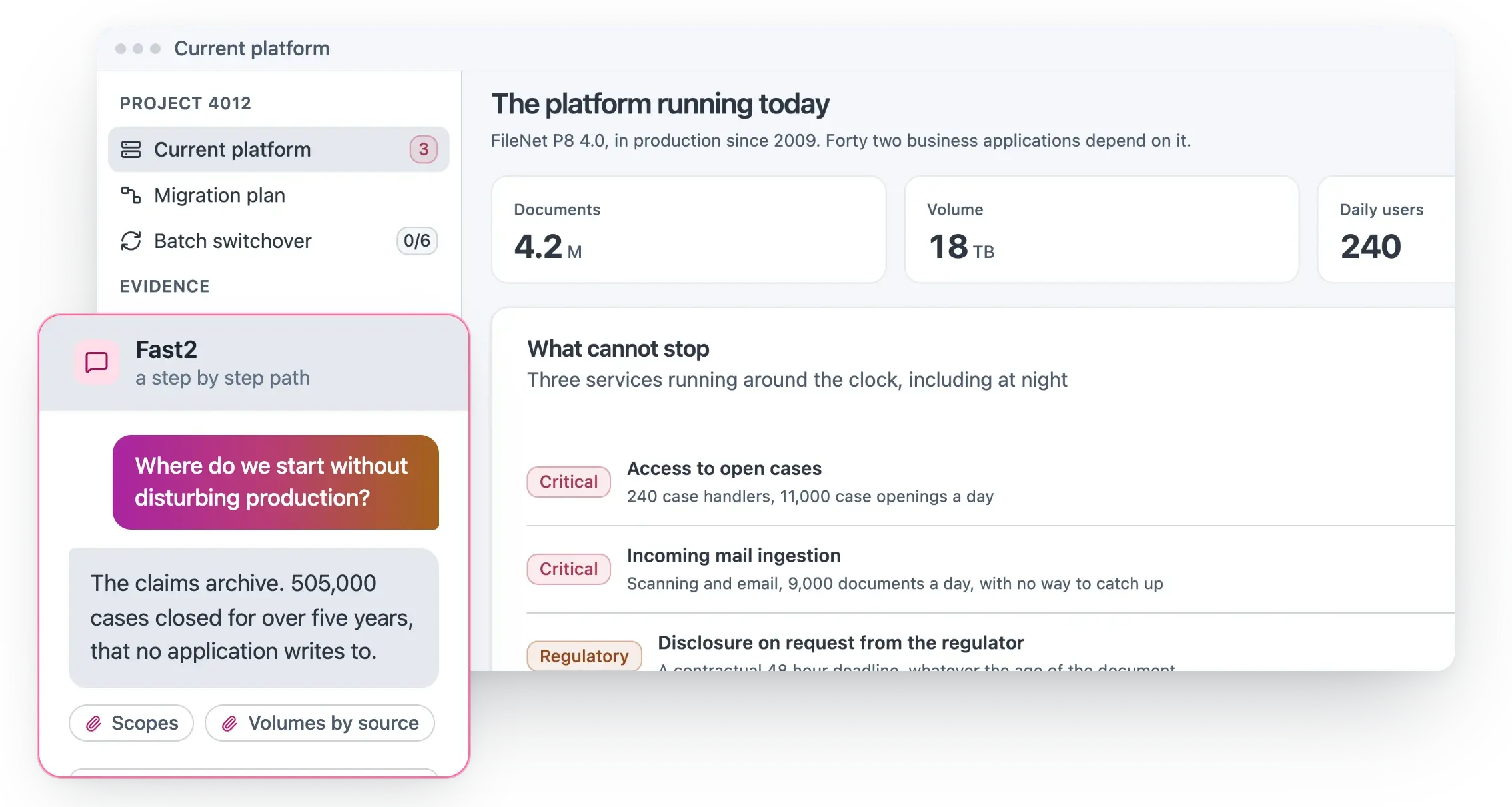
Your content as it really is: volumes, formats, metadata, versions, permissions, relationships between objects, duplicates, and obsolete or orphaned content. The content operations engine takes this inventory before anything moves.
You then build the migration plan on the actual state of your content. The original specs of a fifteen-year-old system rarely describe it well enough.
Do metadata, versions and access rights survive the migration?
Yes, and that is the heart of the job. Each document travels with its context: metadata, versions, permissions and groups, history, relationships and retention rules.
This information can be mapped, normalized or transformed to fit the target platform's model. A document that arrives without its context loses much of its value, and the migration is there to prevent that.
Can you clean up and enrich content during the migration?
Yes, and it is often the best moment to do it. While content moves, you can normalize or complete metadata, convert formats, restructure folder trees, adjust permissions, apply retention rules, and exclude or archive what no longer belongs.
Your new platform starts on cleaner content, and the old system's flaws stay behind.
What role does AI play in a document migration?
AI steps in when existing metadata is not enough to qualify a document. It identifies the document type, suggests a classification, extracts information, fills in metadata and flags anomalies or sensitive data.
You set the frame: which content it can access, which models are allowed, the confidence thresholds, and the cases that go to human review. The content operations engine keeps control of the processing chain, the rules and the audit trail. Learn more about AI on your content.
How do you prove a migration is complete and reliable?
Checks are built into the processing. For each batch, you track the objects read from the source, those kept or excluded, the transformations applied, the errors and the objects created in the target.
A reconciliation report compares expected and actual results, document by document. It decides whether the next batch starts, and it is what you show an auditor.
How much content can a document migration handle?
750 million documents have been migrated with this engine in total. A single program covered 400 million documents in fifteen months, at up to 95 documents per second with six workers, with more than 15,000 transformation rules and 60 entities brought in.
Some documents had more than 10,000 versions, and 50 million Lotus Notes documents were moved with no loss on the scope concerned. You raise throughput by adding workers.
Is the engine only for migrations?
No. The connectors and rules built for the migration keep working after the project: feeding an ECM from a business application, syncing repositories, exporting to an archive, updating metadata in bulk or checking a corpus.
That is the job of Content Operations, one of the four building blocks on the Technology page. The same logic helps you govern your content over time.