Solutions/Universal viewer
Intelligent universal document viewer: access every document without downloads, disruption or loss of control
Your teams need to review contracts, CAD drawings, TIFF images, emails, supporting documents, Microsoft Office files, PDFs, archives, scanned records and complex business content.
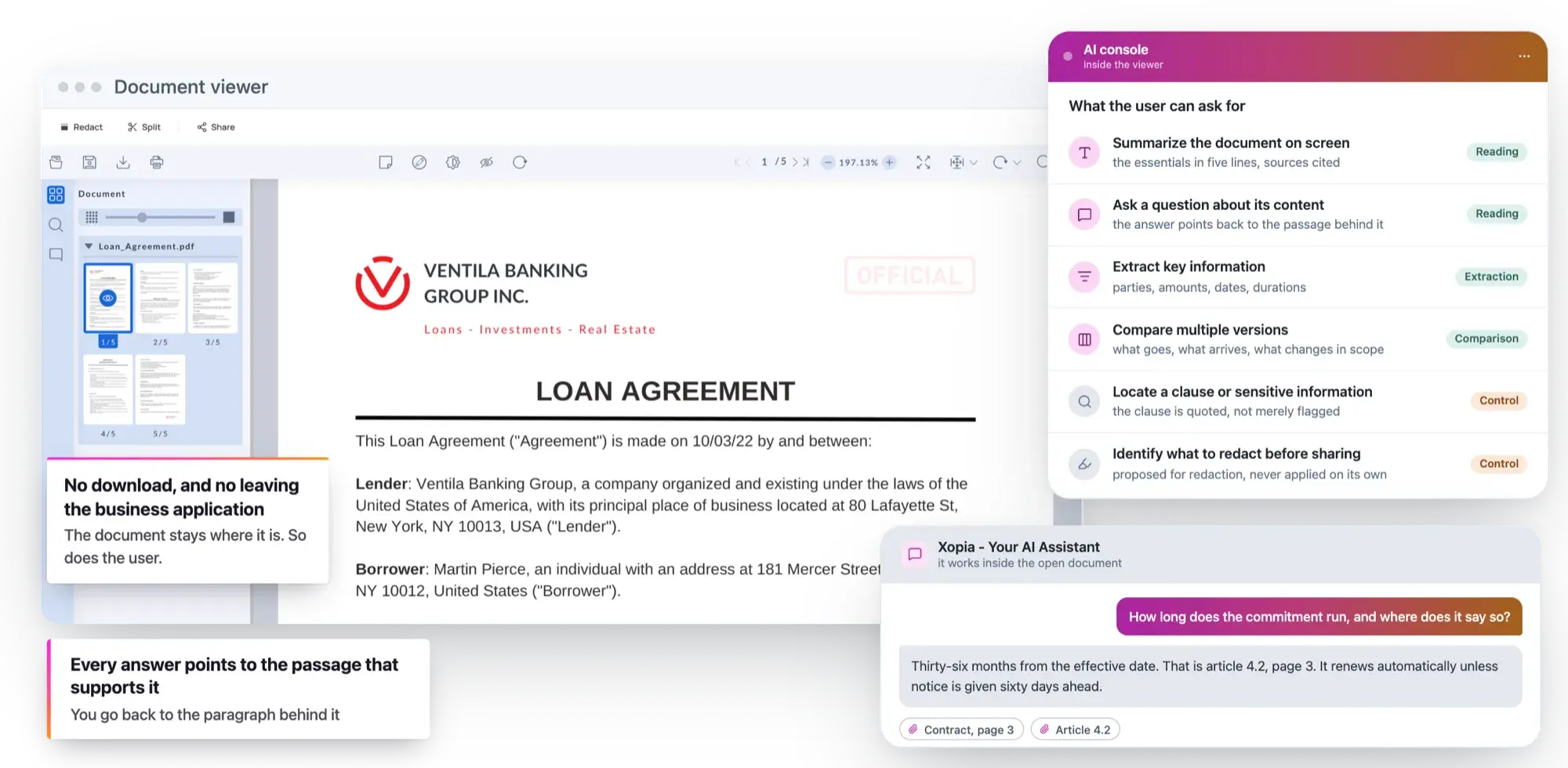
A limited viewer does more than slow users down. It weakens the entire document process.
When a document cannot be opened within a business application, the problem may initially appear to be one of usability.
.jpg)
In reality, it quickly becomes an operational issue.
A case handler downloads a contract in order to compare it. A specialist opens a CAD drawing in a local application. A legal team prints a document to annotate it. An employee extracts an email attachment in order to forward it. A user works around the document management system because the format is not supported.
What the workarounds cost
However, when the viewer embedded in your document management system or business application cannot keep up, users begin working around the system. They download documents, open them locally, print them, compare them manually, annotate them outside the governed process or circulate uncontrolled copies.
.jpg)
These actions are understandable, but they result in a loss of control. Files circulate outside the repository, versions proliferate, annotations are lost, evidence becomes fragmented and sensitive data leaves the governed environment.
What the workarounds really cost
What happens today
Uxopian Software removes these workarounds by providing teams with a complete viewing experience connected directly to their existing document platforms.
What changes
The objective is not simply to open more formats. It is to enable users to work effectively without leaving governed processes.
A good document experience should reduce friction without reducing control.
One viewing layer for all your business content
Open more than 250 formats directly in the browser
PDF, PDF/A, DOCX, XLSX, PPTX, TIFF, JPEG 2000, PNG, DWG, DXF, DICOM, EML, MSG, AFP, COLD, XML, archive files and other industry-specific formats: enterprise case files are never uniform.
A single point of access, inside the browser
A limited viewer forces teams to use several applications, convert files or download content simply to read it correctly.
With Uxopian Software, more than 250 formats can be rendered on the server and displayed in the browser without plugins, local installation or disruption to the user experience. Teams gain a single point of access for all the documents within a case, even when formats are legacy, complex or specific to a particular industry.
Every workaround wastes time. Every download creates additional exposure. Every manual comparison increases the risk of error.
The document becomes accessible within its context, without requiring the user to leave the application in which they are working.
Keep original files within your infrastructure
In sensitive environments, viewing a document should not mean exposing it.
Rendering happens on the server
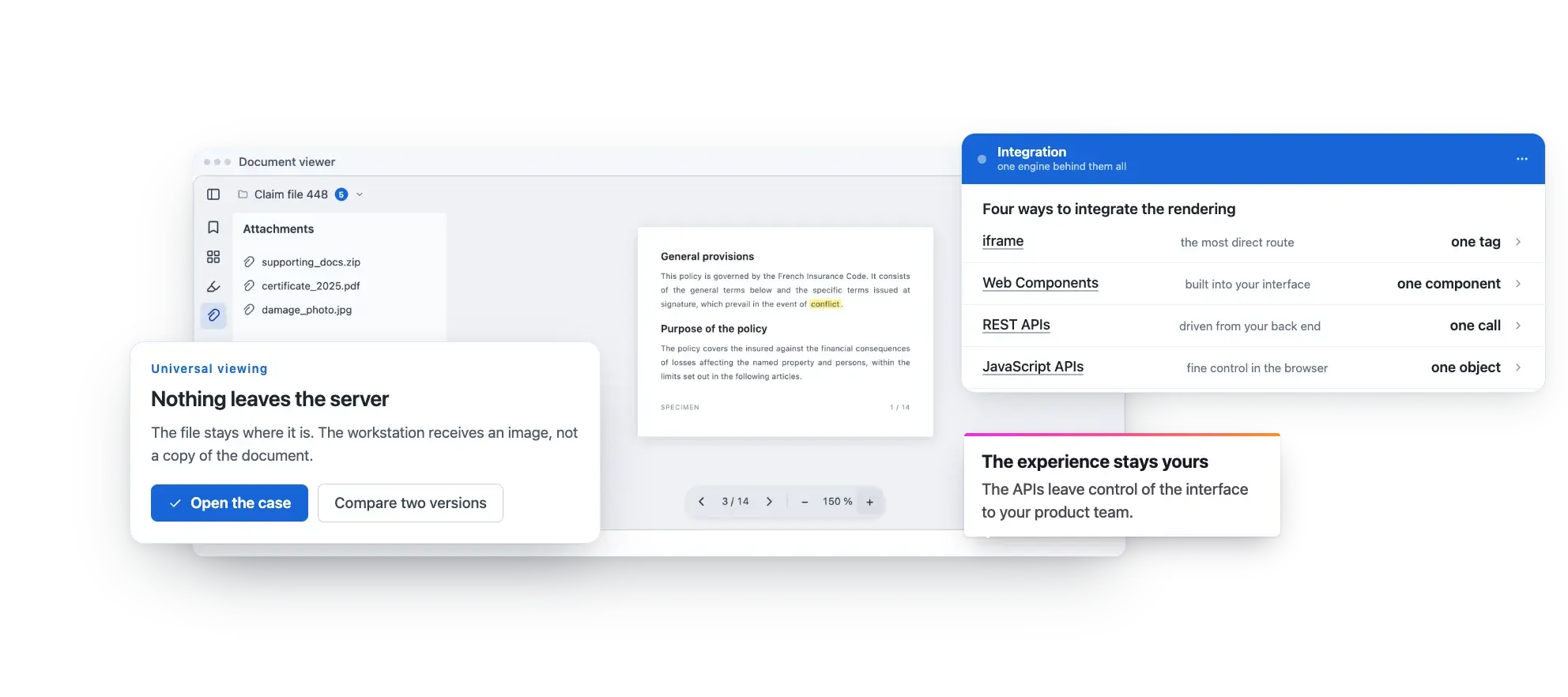
Uxopian Software uses server-side rendering. The original file remains within your document infrastructure, while the user views an accurate visual representation in the browser. This approach limits unnecessary downloads, reduces the exposure of sensitive content and enables you to retain control over access, permissions, logs and distribution rules. Your teams can access the information they need without handling the source file directly when this is not required.
Less exposure, more control
This is a critical distinction for organisations that need to protect customer records, contracts, personal data, medical documents, regulatory evidence or confidential content.

Access without handling the source
With Uxopian Software, employees can view, compare, annotate and protect documents directly in the browser across more than 250 formats, without taking the original files outside your document infrastructure.
What it protects
The viewer becomes a secure experience layer integrated with your existing systems and designed for complex cases, regulated environments and critical business processes. Modernise document access without replacing your document management system, moving your content or exposing your data.

Compare versions without multiplying windows
In legal, regulatory, contractual and quality processes, a minor difference can have a major impact.
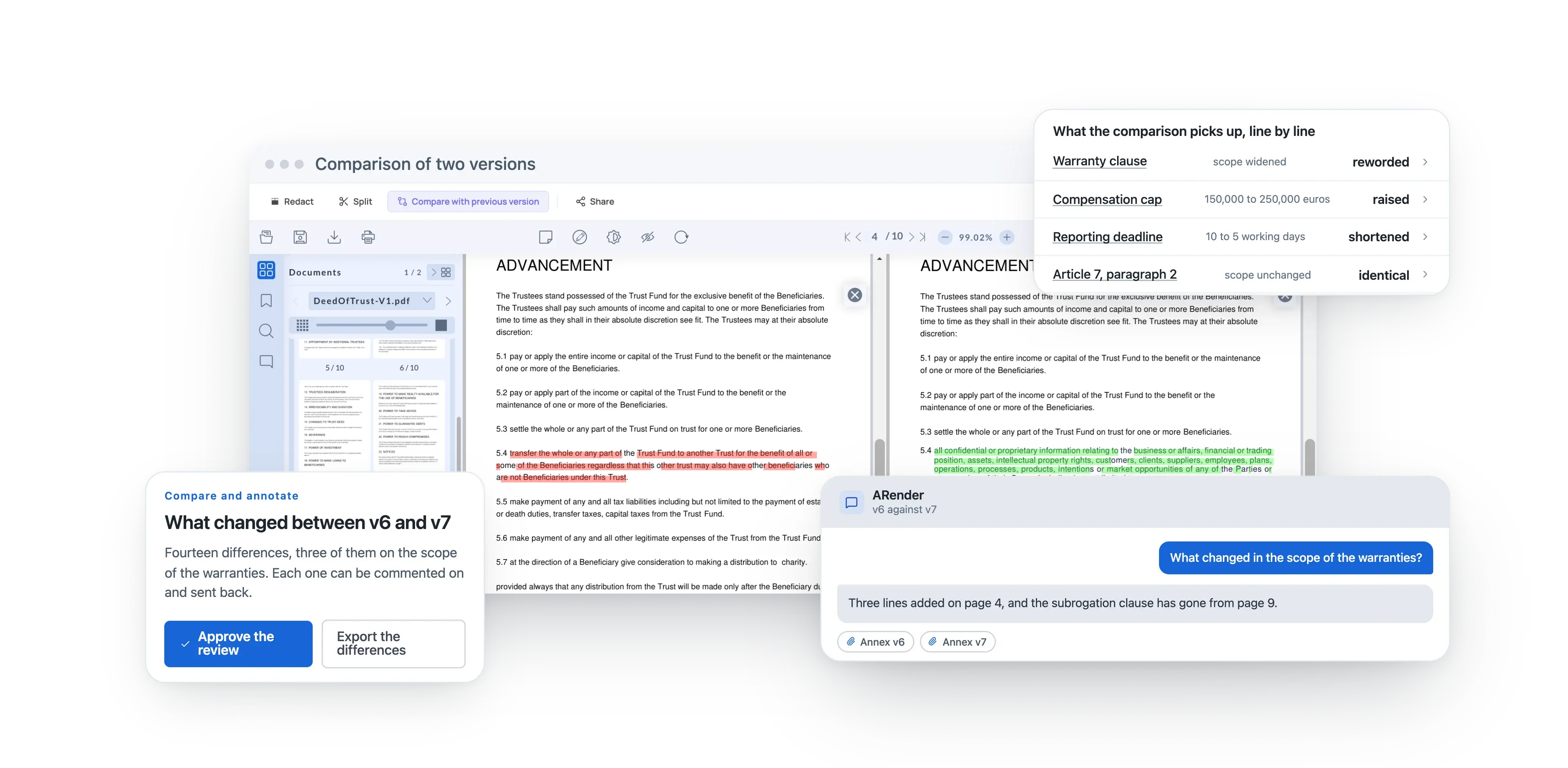
Yet comparing two versions is still often a manual task: two windows opened side by side, line-by-line review, difficult-to-identify changes, invisible deletions and uncertain approvals.
Uxopian Software enables visual and textual comparison, with synchronised display and a faster way to review differences.
What comparison gives back
Teams can identify more easily what has changed, what has been removed, what has been added and what requires approval.
Comparison becomes a supported step within the process rather than a manual exercise dependent on individual attention.
Annotating a document should not require printing it, editing it locally or creating another uncontrolled copy.
Annotate, comment and redact without leaving the process

On the ground
With Uxopian Software, users can add notes, highlights, stamps, comments and annotations directly within the viewer. Annotations can be linked to their author, stored separately from the original file and incorporated into the traceability rules of the process.
- Notes, highlights and stamps The viewer also enables sensitive information to be redacted when content needs to be shared, transmitted or reviewed within a restricted scope.
- Redacting sensitive information The document remains usable, while data that must not be exposed can be protected within a controlled framework.
- The document stays usable Data that must not be exposed is protected.
A viewer designed for existing systems, not to replace them
Most large organisations already rely on core document platforms such as Alfresco, Nuxeo, OpenText, FileNet, Documentum, M-Files, Amazon S3, business applications, internal portals or bespoke platforms.
These environments are often critical, certified, deeply integrated and difficult to replace. Uxopian Software does not require you to rebuild your document architecture in order to improve the user experience. The viewer integrates with existing systems through connectors, APIs and embeddable components.
It can be used within a business portal, document management system, case management application, customer area, extranet, HR platform, legal environment or SaaS solution.
You modernise document viewing wherever users already work.
The viewing layer arrives inside the tools people already open.
A rendering architecture designed for security, performance and continuity
Server-side rendering to reduce document exposure
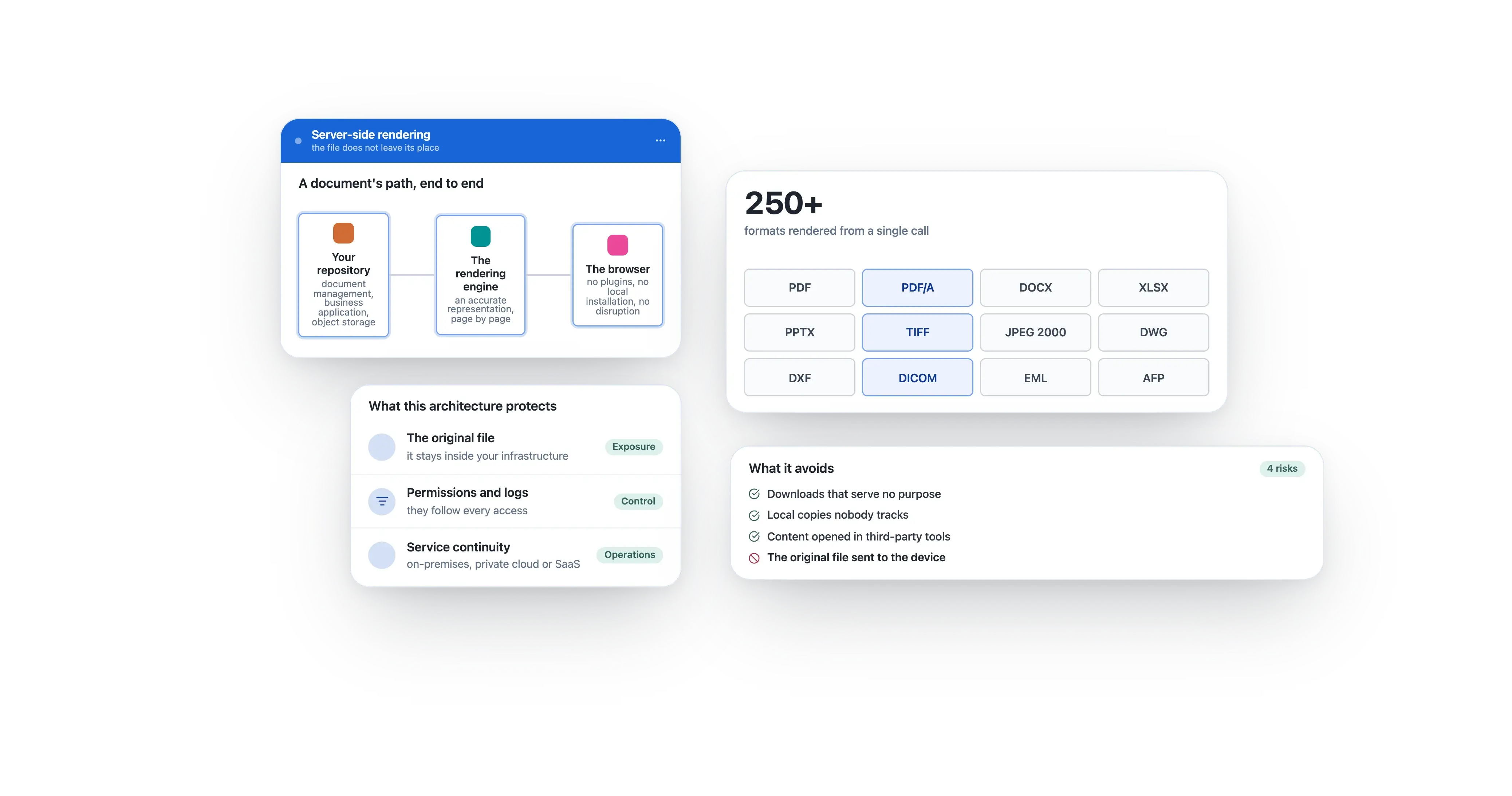
Server-side rendering converts documents into visual representations before they are displayed in the browser.
Users can review the content without the original file necessarily being transferred to their device.

What server-side rendering puts out of reach
This architecture addresses two requirements at once: improving access to documents while retaining control over the source files.
- Local downloads It reduces the risks associated with local downloads, uncontrolled copies and opening content in third-party tools.
- Uncontrolled copies versions the repository never sees again
- Third-party tools files that leave the governed environment
- The required level of security For regulated organisations, this approach improves the user experience without weakening the required level of security.
APIs, embeddable components and progressive integration
The Uxopian Software viewer can be integrated into applications through iframes, Web Components, REST APIs and JavaScript APIs.
Modernisation becomes incremental: one use case, application, portal or document scope at a time.
Who gains what from progressive integration
SaaS providers can rapidly add advanced rendering capabilities to their products. Large organisations can modernise portals and business applications progressively. IT teams retain control over integration, interface design and deployment.
This approach enables organisations to create a seamless document experience without carrying out a complete application redesign.
On-premises, private-cloud or SaaS deployment
Hosting requirements differ across healthcare, banking, insurance, the public sector, legal services and SaaS platforms.

Three deployment models
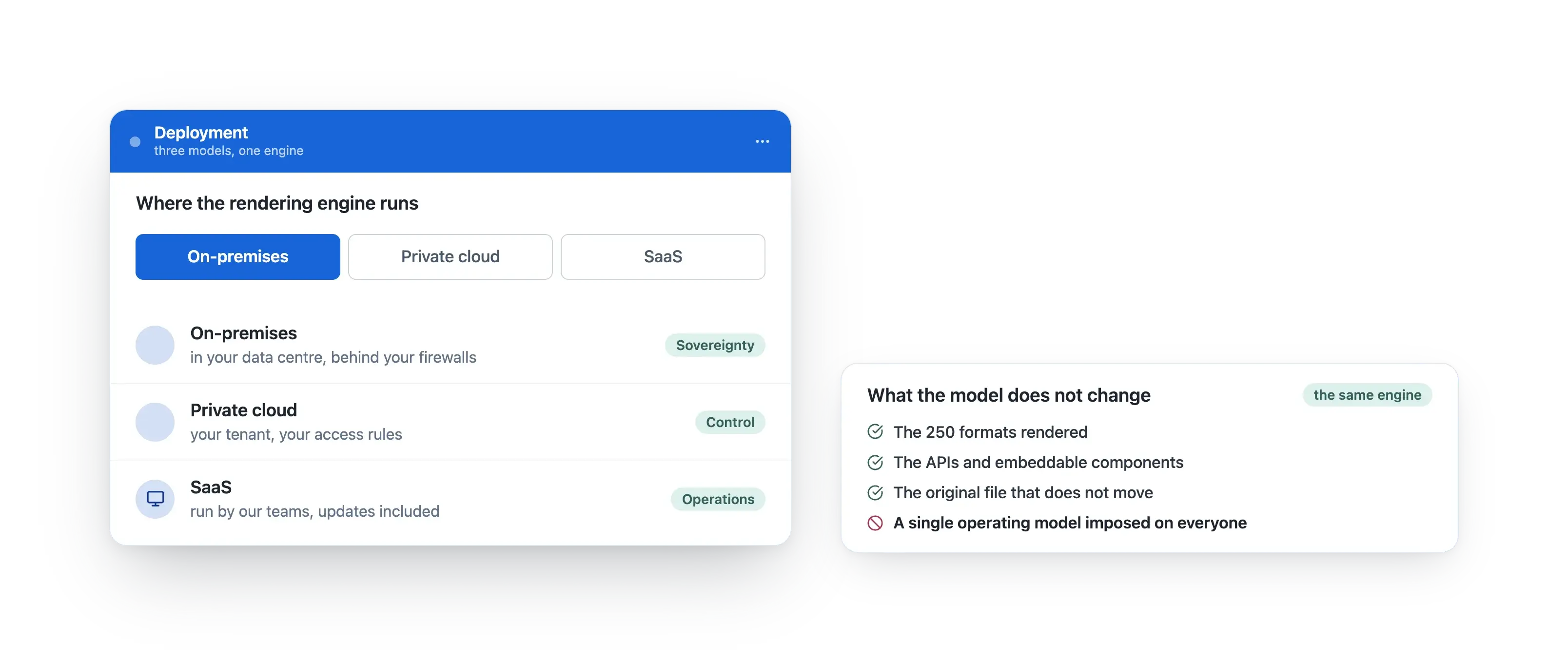
Uxopian Software enables the deployment model to be adapted to your environment: on-premises, private cloud or SaaS.
What the flexibility protects
This flexibility helps you meet security, architecture, sovereignty, compliance and performance requirements.

The viewer fits within your infrastructure strategy rather than imposing a single operating model.
Critical use cases within complex business processes
Insurance claims, contracts, expert reports, photographs, correspondence, emails and supporting evidence all require fast, reliable and traceable access.
What each field asks for
Teams can prepare disclosure-ready copies, trace completed actions and reduce the risks associated with manual handling.
Insurance and legal
Teams need to review the entire case, compare versions, annotate documents, redact selected information and transmit content without losing control.
Uxopian Software brings these capabilities together within a single interface connected to the document repository and business processes.
Case handlers spend less time manipulating documents and more time analysing the case.
Healthcare
A patient record may combine PDF reports, scanned prescriptions, medical images, forms, correspondence, administrative documents and historical records.
In this context, the viewing experience must be seamless while the environment remains controlled.
Public sector
Public authorities must make certain documents available while protecting information that cannot be disclosed.
The challenge is not simply to locate the document. Teams must also redact sensitive information, preserve evidence of the action taken and meet statutory deadlines. Uxopian Software enables content to be viewed, annotated and redacted within a more controlled framework.
Software providers
For a software provider, document viewing can become a major development programme: supported formats, performance, rendering accuracy, annotation, security, comparison, APIs, scalability and ongoing maintenance.
Uxopian Software enables advanced rendering capabilities to be integrated into an existing platform without committing several development quarters to a non-differentiating component.
The APIs allow providers to retain control of the user experience while relying on a proven viewing engine.
What each field gains from it
Uxopian Software enables varied formats to be viewed directly in the browser while source files remain within the secure document infrastructure.
Healthcare professionals access the documents they need without multiplying tools or taking sensitive files outside the controlled environment.
The provider accelerates its product roadmap without creating document-related technical debt.
A better user experience that strengthens document governance
Document security should not depend solely on restrictions.
Restriction is not enough
When tools are too slow, too limited or too difficult to use, employees will naturally seek workarounds.
The tension eases
The Uxopian Software viewer reduces this tension by enabling users to work effectively within the environment defined by the organisation.
Staying inside the process
They can open the right formats, view without downloading, compare without exporting, annotate without printing, redact without improvised tools and remain within the governed document process.
Governance built into the work
The user experience therefore becomes a governance mechanism: fewer local files, fewer copies, fewer parallel versions and fewer breaks in the chain of evidence.
Modernisation does not add another layer of complexity. It makes the existing framework easier to follow.
What changes for your teams
For business users
Users can access the documents they need more quickly, even when formats are complex or heterogeneous.
They no longer need to download, convert, print or open several applications in order to process a case.
They can focus their attention on analysis, verification and decision-making.
For IT teams
IT teams improve the document experience without replacing existing core platforms. They can integrate a single viewing layer across several applications, reduce bespoke development and retain control over deployment.
Modernisation becomes progressive, integrable and compatible with information-system constraints.
For compliance and security teams
Compliance and security teams reduce the exposure created by downloaded files, local copies and annotations made outside governed processes.
They benefit from a more controlled framework for access, redaction, traceability and the viewing of sensitive content.
Control no longer depends solely on rules. It is built into the working experience.
For product teams and software providers
Product teams can integrate an advanced document experience without diverting their main product roadmap.
They rely on a robust, customisable and embeddable rendering engine while retaining control over the user experience.
The viewer becomes a product capability rather than technical debt that must be maintained.

Choose a viewer that modernises the experience without weakening control
What happens today
A document viewer is no longer simply a display feature.
What changes
In complex organisations, it influences team productivity, data security, decision quality, process traceability and the adoption of existing document systems.
Uxopian Software enables you to modernise this experience without rebuilding your document information system.
Open every document. Reduce workarounds. Stay in control.
The universal viewing layer, rendered on the server.
The document read inside the viewer, with its sources.
The layer that connects your repositories and your applications.
Where to start
You retain your repositories, access rules, business applications and infrastructure constraints. You add a universal, secure and embeddable viewing layer designed for real-world use.